Ryder Cup pairings dashboard — feature guide
What the app does, screen by screen, for the people who run it.
This is the reference. TRIP-RUNBOOK.md is the checklist — what to do and in what order on the weekend itself. If you are standing in a rental house with a Fire TV Stick in your hand, read that one. If you want to know what a control does before you press it, or what the app will refuse and why, read this one.
Live at https://ryder-cup.pintor.host (backup: https://ryder-cup-sandy.vercel.app).
About the screenshots
Every screenshot here was taken against a local development database seeded with invented data — twenty fictional golfers, a made-up course called Seed Valley, and rounds named Seed — …, one per scoring mode. Nobody pictured is on the trip and no real result is shown.
The codes visible on the Codes screen (red-1234, blue-5678, boss-9012) are local placeholders from a developer's laptop. They are not the production codes and do not work against the live site.
1Roles and access
Three roles, one code each, entered at /enter.
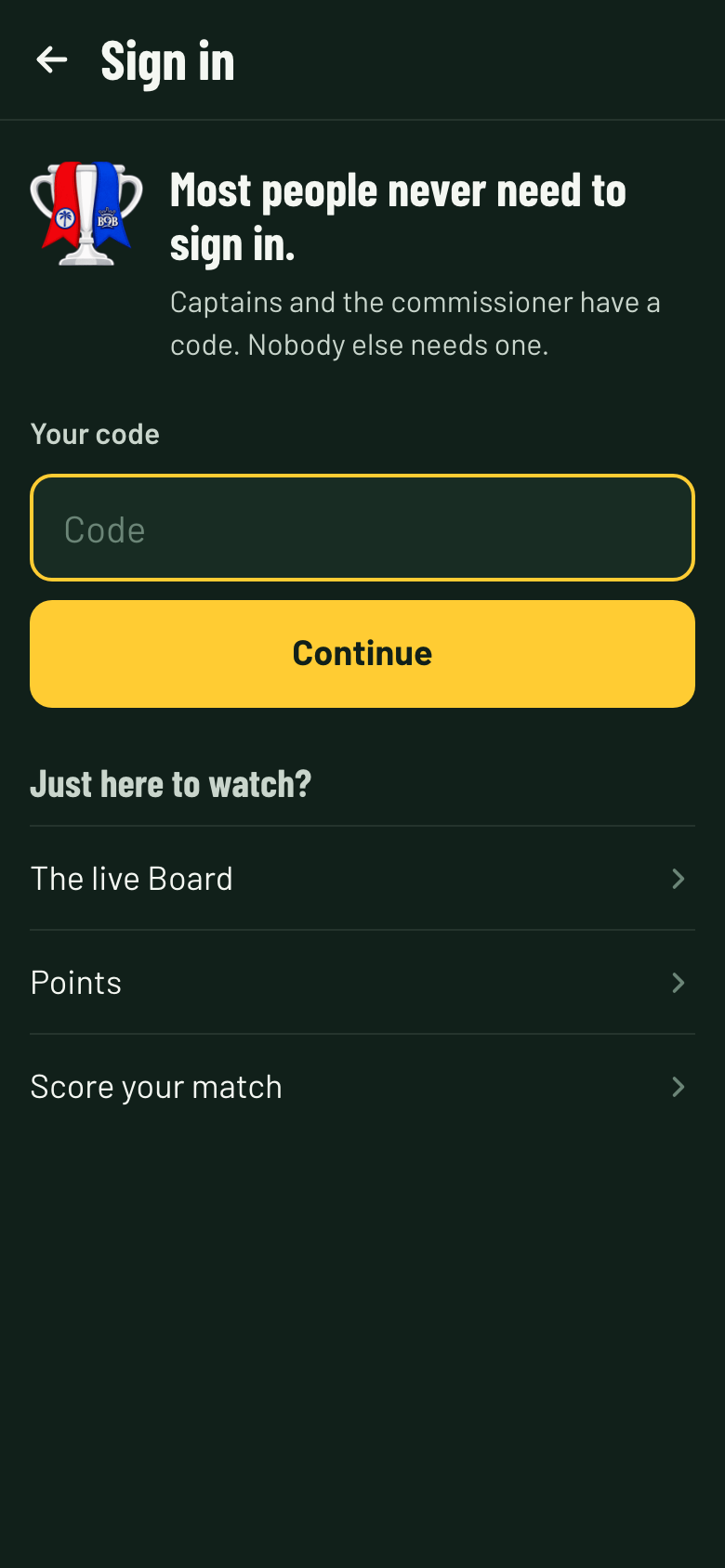
The page says it first, beside the trip's trophy emblem: Most people never need to sign in. Only the captains and the commissioner have a code. Type it into Your code and tap the yellow Continue; the commissioner lands in Setup, and a captain on Pick, or the Board when no draft is on. Everyone else can go straight on from Just here to watch?, which links to The live Board, Points and Score your match. A phone that is already signed in says who it is and offers Sign out.
| Role | Gets | Can |
|---|---|---|
| Commissioner | ⚙ Setup in the header | Everything except picking. Creates rounds, starts drafts, edits people and courses, drives the TV. |
| Captain (red / blue) | Their team's initial, in a circle of its color, in the header, and a Pick tab while their draft is live | Nominate and answer for their own team, never the other's. Post photos and read the itinerary without the trip code. |
| Spectator | Sign in in the header | Watch the board, read standings and records, and enter scores. No code needed, except for the itinerary. |
Three things about this worth knowing before the weekend:
- The commissioner never picks. There is no Pick tab for that role at all. The one exception is a rehearsal round, which the commissioner drives for both sides from Setup → Demo & rehearsal (§9) — and even then only as whichever team is already on the clock.
- A browser holds exactly one code. Entering a second replaces the first, so a captain who borrows your phone to sign in leaves you signed in as them. Each captain needs their own phone. The header always shows which role a browser is in, so you can check without guessing, and More names it in words at the top of its list.
- Scoring deliberately needs no code. Five groups are on the course at once and none of them will wait for one person, so anyone with the link can report a result or fill in a scorecard. This is the single most important design decision in the app: a scoreboard gated behind one person is a scoreboard that stays wrong all afternoon.
Code entry is throttled — ten wrong attempts from one address inside fifteen minutes triggers a flat thirty-second wait. It counts the whole hotspot together, so it is usually somebody else's typing, and any correct sign-in code clears it for everyone. A wrong trip code (below) counts toward the same wait, but a right one never clears it: otherwise anybody who knows the trip code could reset the wait on guesses at the captains' codes.
Codes are changed in the app at Setup → Codes, with no redeploy. The screen shows all three in full, because you will be reading them out loud.
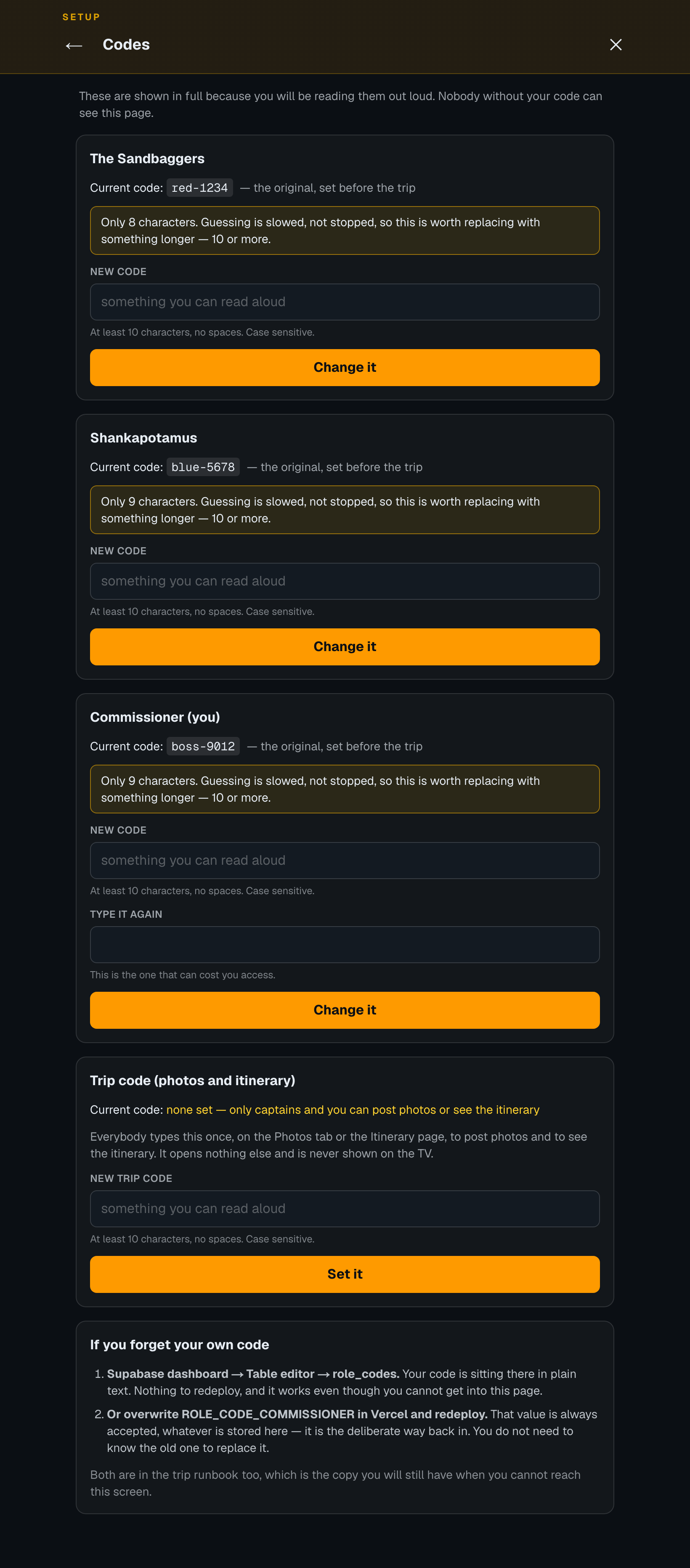
Changing a captain's code kills the old one. Changing your own does not kill the original environment-variable code — that stays valid forever on purpose, and it is the documented way back in if you lock yourself out.
The same screen holds one more code, which is not a role: the trip code. Everybody types it once, and it opens two things: posting photos (§8) and the itinerary (§2).
2Getting around
Five tabs, the same five for everyone, at the bottom of every screen.
| Tab | Route | What it is |
|---|---|---|
| Board | /watch | The live draft, then the round being played. A captain mid-draft gets Pick in this slot instead. |
| Points | /standings | The race to win the trip, round by round. |
| Card | /results | Report a result, or score a match hole by hole. |
| Photos | /photos | Every photo from the trip, and where you post your own. |
| More | /more | Everything else. |
The tab you are on is yellow. Above every tab's screen sits the scorebug, the trip score: each team's name and points in a panel edged in its color, with a bar under the two split by the score. On a phone, a team is always named in words, in its color; the logos are for the television.
More, the last tab, is one list, and your role comes first: a captain's row is their team in its color with Switch or sign out, the commissioner's says Setup and sign out, and anybody else's is Sign in. Then Players (every player's record for this trip, and across every trip: 2v2, singles and overall), Awards (once a round's awards have been played), the Itinerary and How this app works, which is this guide.
← goes back to the page you were on. On a tab it sits at the left of the header: Board → Points → ← returns to the Board. Opened fresh — from a link in a text, a bookmark — a tab has no ←, and a page under More or inside the Card tab goes up a level instead. iPhones older than iOS 26.2 always get that second behavior: the browser does not tell the page what is behind it. Two screens differ: a matchup's card's ← always goes to its round, back the same way when the round is the page you were just on, and Setup's ← always goes up one level.
The circular arrow, top right, beside Sign in, ⚙ Setup or your team's initial, reloads the screen. If anything looks stuck — scores not moving, a draft that has stopped — tap it. A phone that has been asleep catches up on its own when it wakes, but this is the sure way. Holes not yet sent are kept on the phone and survive it. With no signal at all it says No signal instead of reloading, so the Card keeps working until signal comes back.
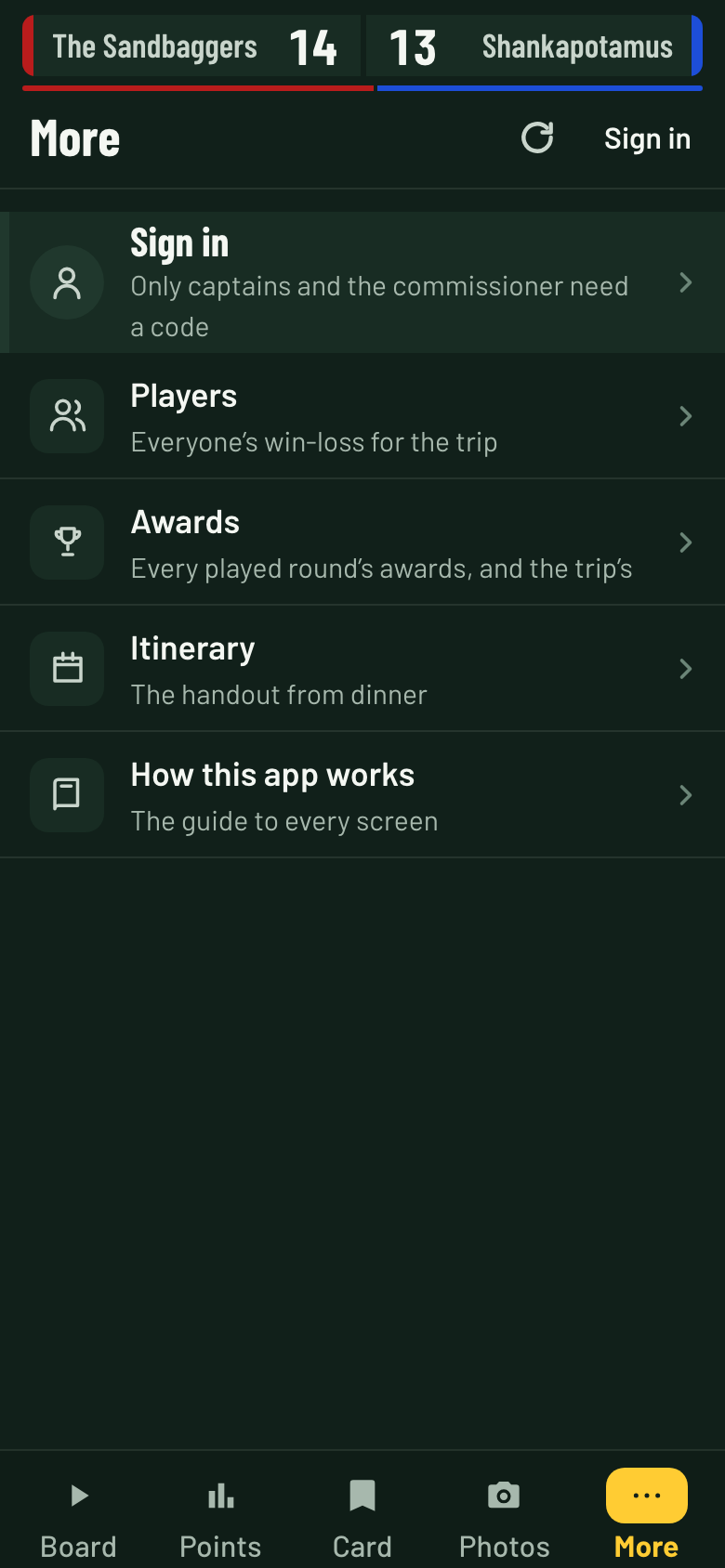
The labels and the routes deliberately don't match — those paths predate the vocabulary and are already bookmarked.
Setup is a section, not a tab. It is entered from the ⚙ in the header, which only the commissioner sees. Inside it the tab bar goes away and amber chrome takes over, with ← for one level up and ✕ to leave the section entirely and land back on the tab you came from, or More.
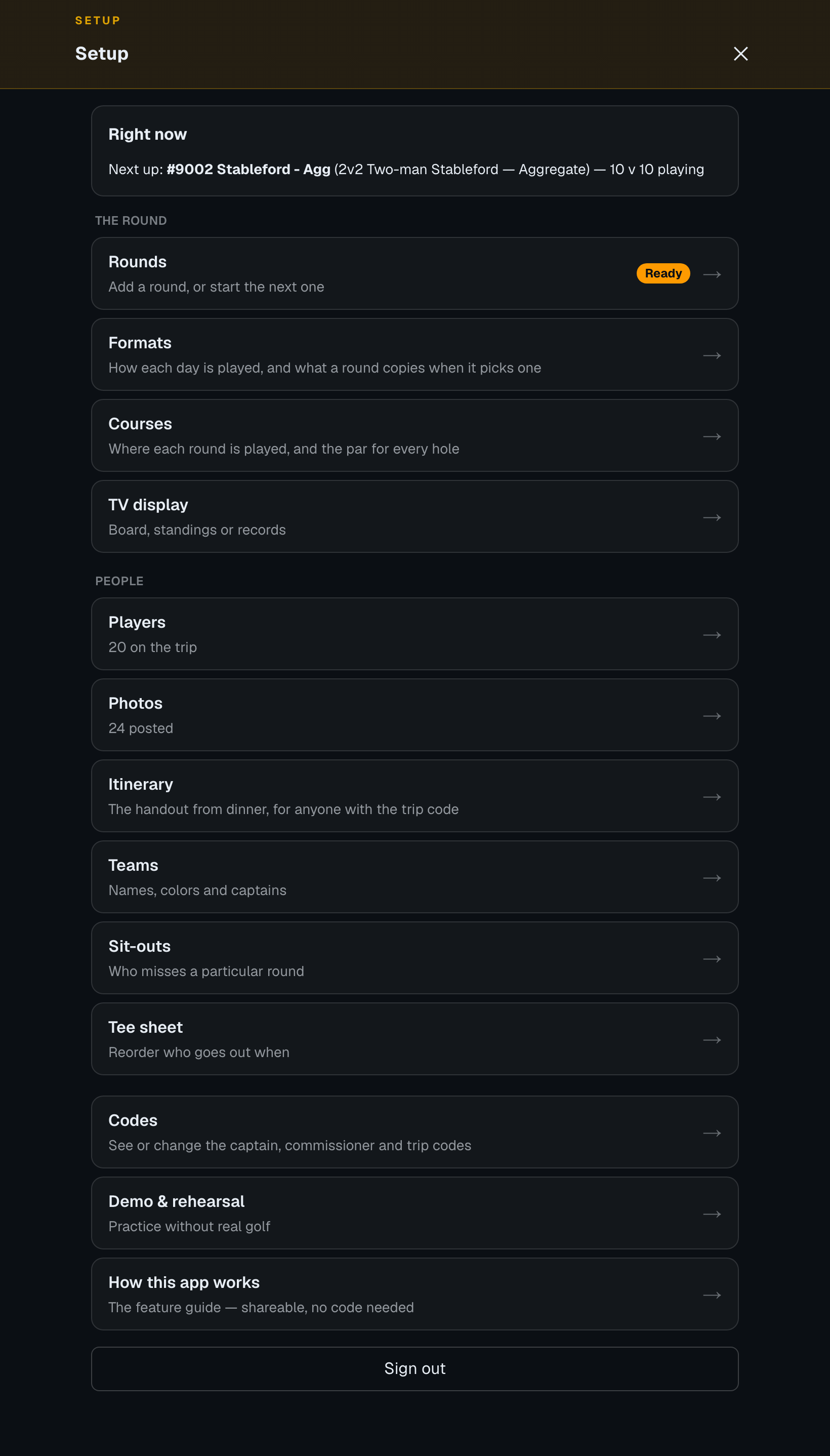
If a form has unsaved changes, both leave controls turn into a Leave / Stay confirmation rather than silently throwing the edit away.
The itinerary
The handout from dinner, on the site: up to six images the commissioner posts — the itinerary itself, and anything else worth having to hand, like the addresses. More always lists it, saying "Not up yet" until something is posted, and it opens /itinerary; the Board carries no row for it, so a live draft is left alone.
It is the one page that needs a code. It may hold the house address or a gate code, so it asks for the trip code, the same one as posting photos; a captain or the commissioner skips it. If the code is changed, the page asks for the new one the next time it loads or refreshes; a page already open keeps showing until then, and an image a phone has already loaded stays in its cache for up to a week. The images are full width. Tap one to see it on its own, full screen: turn the phone sideways to make it bigger, pinch to zoom, and slide a finger up or down — or use the phone's back gesture — to get back to the list. Each has Save image 1, Save image 2…, which works like Save this photo (§8): on a phone it opens the share sheet, so a copy can go in the camera roll for the course, where signal is poor.
Setup → Itinerary is where the commissioner adds images (several at once), captions them, moves them up and down, and deletes them. Nobody sees anything until the first one is added, so adding it at dinner is the hand-out. It is never on the television.
3Setting up the trip
Do this in roughly this order. Everything except rounds can be done weeks ahead.
People
Setup → Players. Twenty players, ten a side. Tap a name to expand their fields — team, active flag, their record from every trip before this one (2v2 and singles), and a photo.
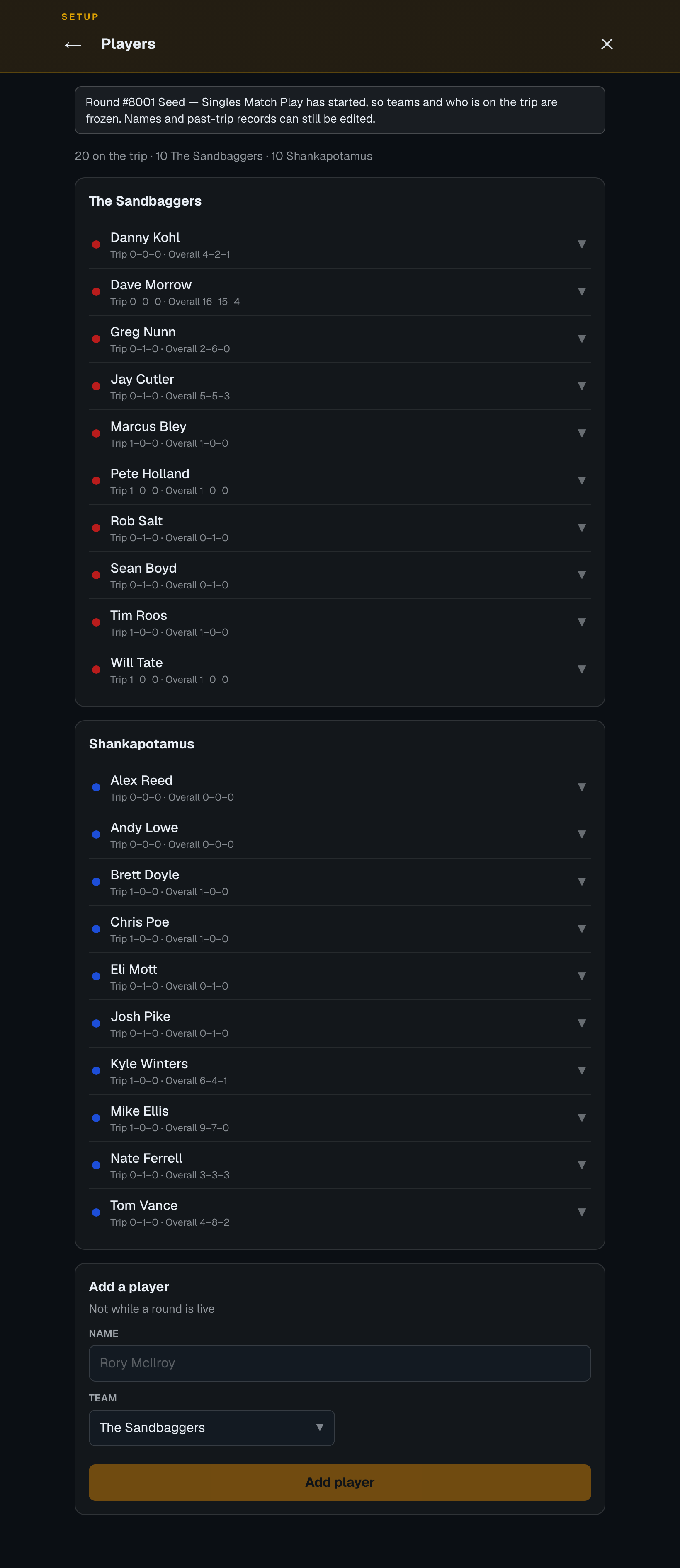
Photos are optional; initials avatars work fine and are what the boards fall back to. If you do upload one, you get a pan-and-pinch crop editor over a circular mask, and the image is downscaled in the browser before upload — twenty headshots land at about 4MB rather than 70MB, which matters on a hotspot. Cut-out photos with transparent backgrounds are preserved rather than flattened onto black.
Deleting a player who has already appeared in a real match is refused, twice over. Their match rows name them by id and there is no way to rewrite history sensibly.
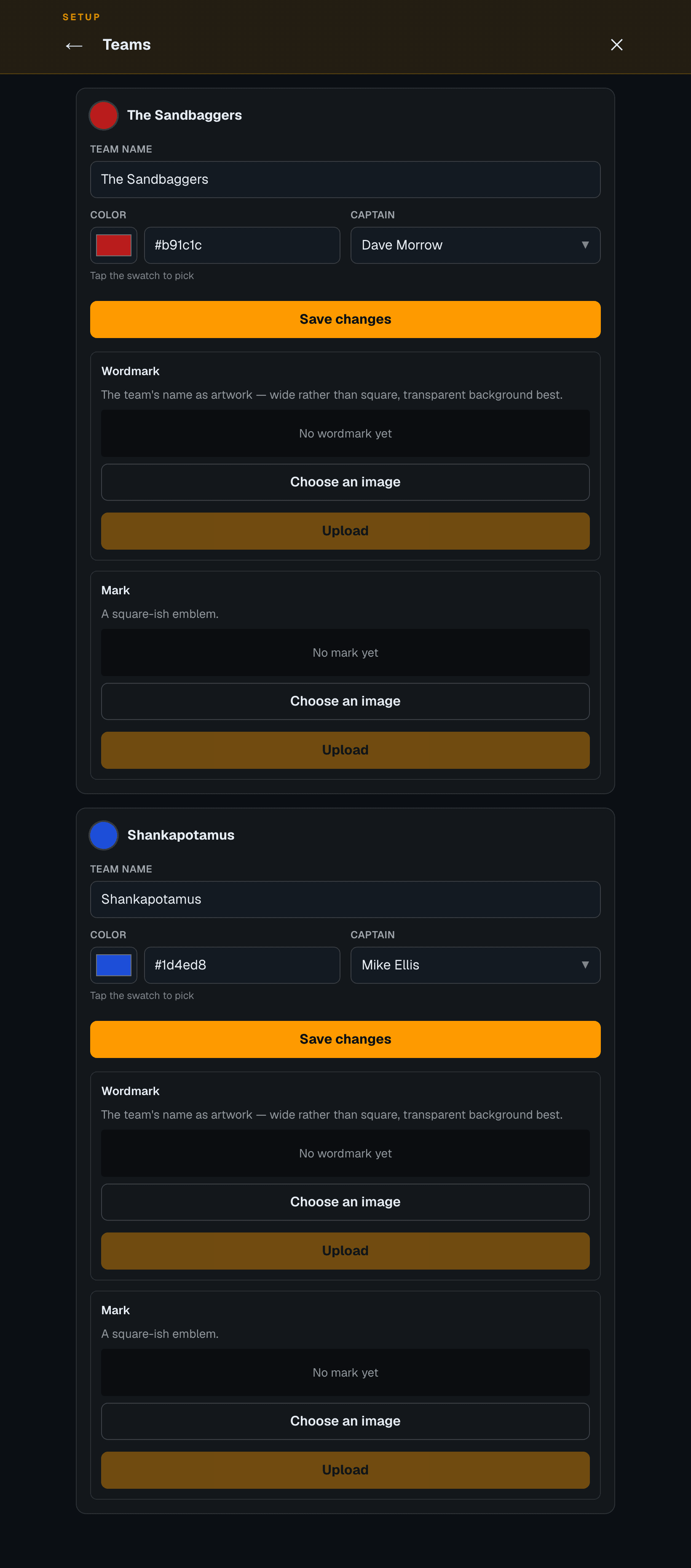
Setup → Teams. Names, colors, captains, and an optional logo per side. Team names are free text and are used everywhere, so renaming a team mid-trip is safe. If a team's artwork is dark, turn on Glow behind the logos: a white glow behind its wordmark and mark wherever they appear, so they read on the dark board. The screen also warns, under the colors as you pick them, when the two team colors are too close to tell apart on a scorecard (including for a red-green colorblind golfer) or when a color is too dark to show on the board. It is advice: the save still goes through.
Formats
Setup → Formats. A format is how a day is played: a name, how many players a side, a scoring mode, and your own note explaining how it works.
Every format is one row — its name, then how many players a side and its scoring mode — and every row starts closed. Tap one to open its form; only one is open at a time. Save changes closes it again with a green ✓ Saved beside its name, and Cancel, at the top or the bottom, closes it without saving. Delete sits under the form, for a format no round is using. + Add a format is a single dashed button under the list.
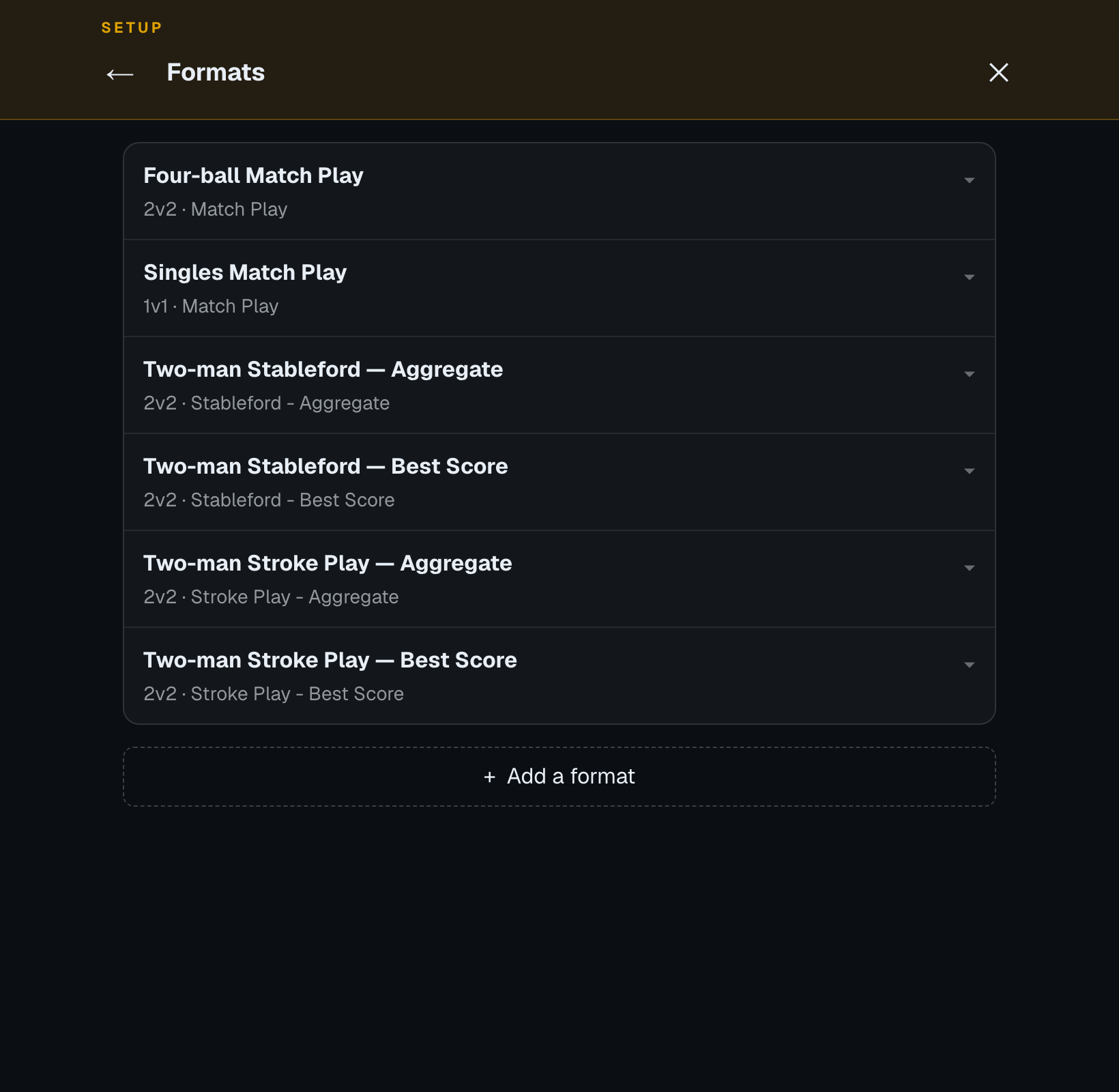
There are six scoring modes:
| Mode | What it means |
|---|---|
| Match Play | One individual or team wins the hole. |
| Stableford — Aggregate | The points for each team member are counted and aggregated. |
| Stableford — Best Score | Only the best point value for the team is taken for the hole. |
| Stroke Play — Aggregate | The score for each team member is counted and aggregated. |
| Stroke Play — Best Score | Only the best score for the team is counted for the hole. |
| Stroke Play — Alternate Shot | The team plays one ball, alternating shots. One score per team is counted for the hole. Two a side only. |
Only match play can close a match out early ("3&2"). The others are decided on the eighteenth, because a single hole swings enough that early elimination would essentially never fire and isn't a rule anyone watching would expect applied.
A round copies its format's details when you pick it, and does not track later edits. So editing "Four-ball" in October changes future rounds and leaves Thursday alone. Deleting a format that a round is using is refused.
Courses
Setup → Courses. A name, a location, and the par for every hole — nine holes or eighteen.
Every course is one row (its name, then its holes, its par and where it is) and every row starts closed. Tap one to open its form; only one is open at a time. Save changes closes it again with a green ✓ Saved beside its name, and Cancel, at the top or the bottom, closes it without saving. Delete sits under the form, for a course no round is playing. + Add a course is a single dashed button under the list.
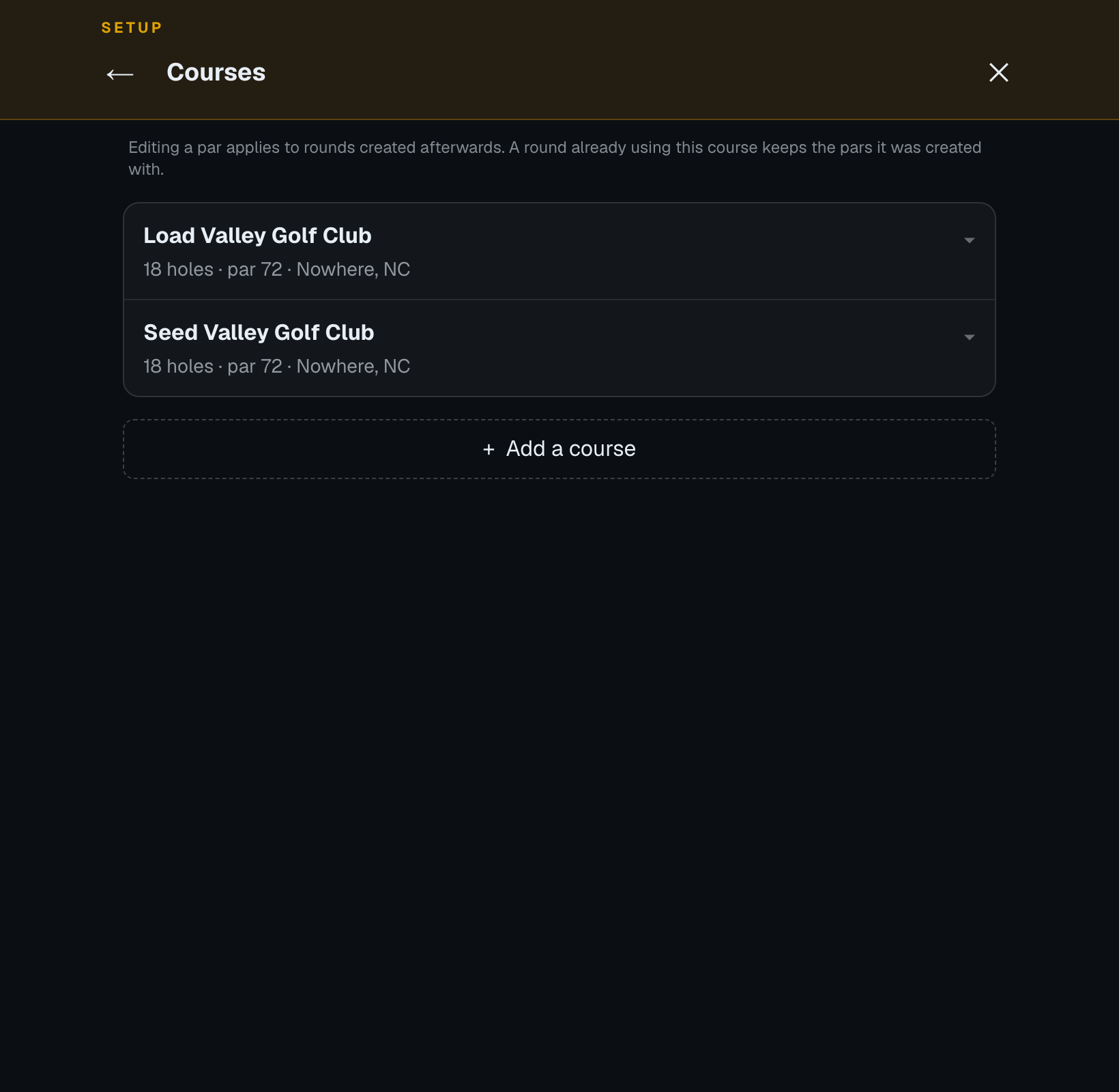
The pars are laid out like the printed scorecard: nine holes to a row, with OUT and IN at the end of each row and the total under them, so a card can be copied row by row. The totals move as you type. Typing into a filled cell replaces its par, and the cells ask a phone for its number pad. A par that is not 3, 4, 5 or 6 turns red as you type, with the hole named under the card.
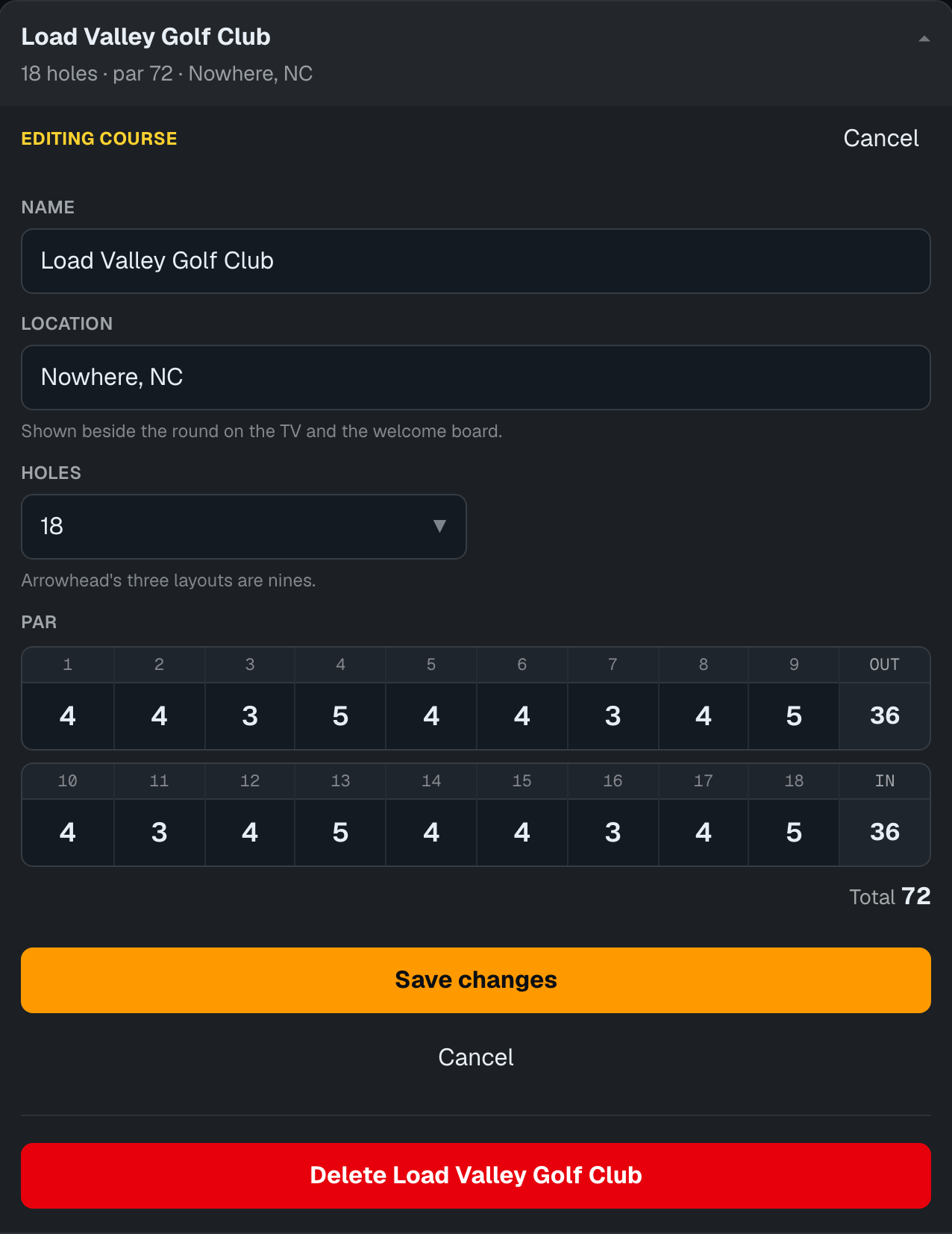
Nine-hole layouts exist because some clubs (Arrowhead, for one) are three separate nines and decide which one you get on the day.
Pars are what let the scorecard offer named rungs — Eagle, Birdie, Par, Bogey, Double, Triple and Pickup — instead of a bare number pad. A round with no course still scores fine; it just asks for numbers.
As with formats, a round snapshots its pars rather than reading them through the course. If you fix a par typo in October, Thursday's card still means what it meant on Thursday.
Rounds
Setup → Rounds. Every round is one row, and every row starts closed. A row states the round's format and course, then when it goes off, and flags anything still to do — No course set yet in amber (on a split round, it names the nine), Can't start yet in red — only when it is true. So you can scan the weekend without opening anything.
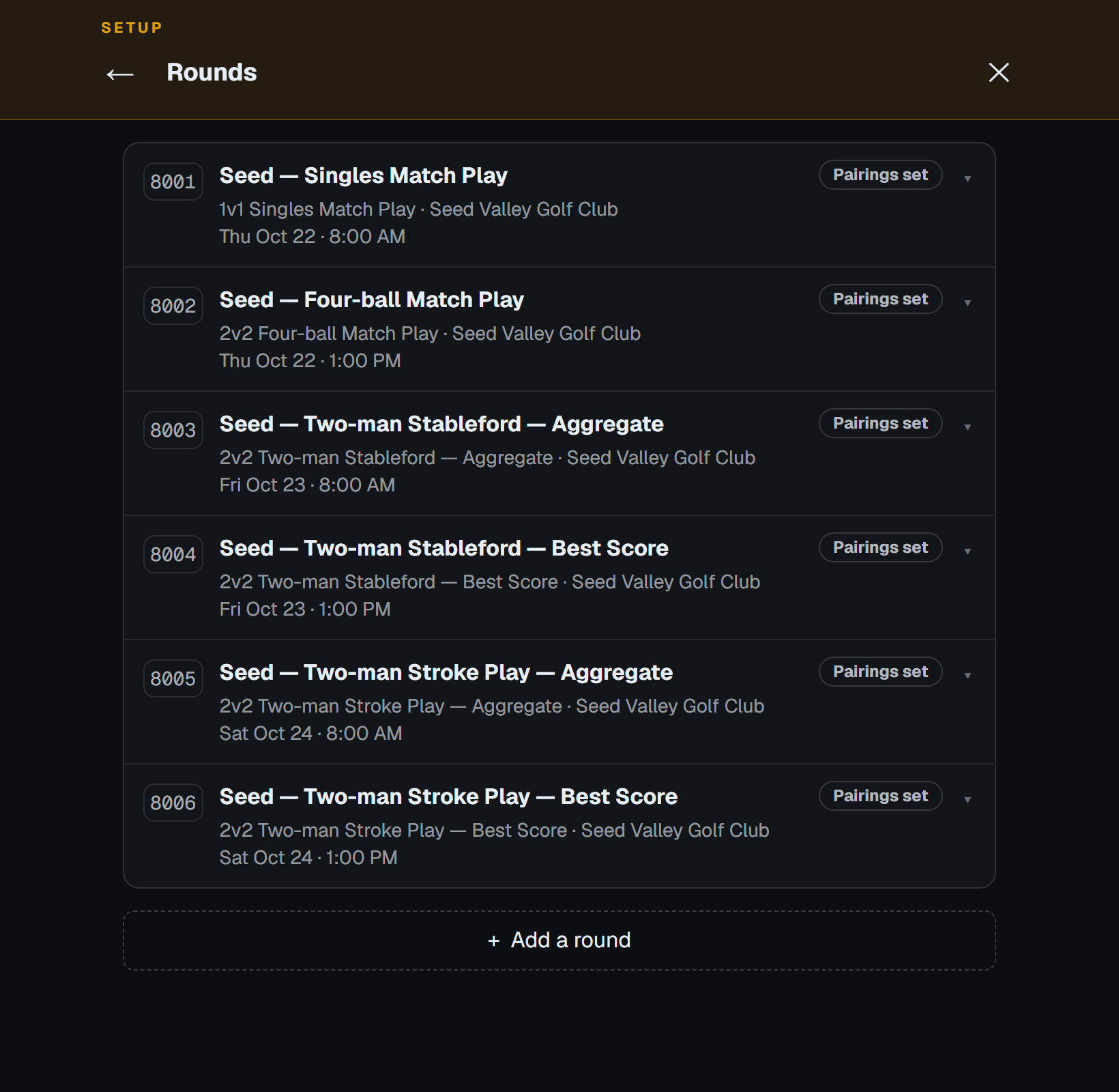
Tap a row to open that round. Only one is open at a time: opening another closes it, and tapping an open round's row closes it too. An open round reads as text rather than a form — its course, with Change beside it, directly above its tee time, then its tee interval and format. A course not set yet shows its picker instead, already open. A split round played on two afternoons gets one group per nine, so each nine's course sits directly above the time it goes off. On a round not started yet, under the details are the buttons that start the draft (see Starting it, below).
+ Add a round is a single dashed button under the list. It opens the form: sequence (play order — this is what orders the standings, not the date), a label, a date, a format, a course, first tee time and tee interval.
A few things this screen does that aren't obvious:
- A course is optional at creation. The picker defaults to empty rather than to whichever course sorts first, because a placeholder is something somebody has to remember to swap. Fill it in later, from the open round, when the club tells you which nine you have.
- A round can be split across two nines at two courses — the Chapman on this trip is one round, eighteen holes, played as two nines at two venues on two afternoons. Tick "Two nines at two courses" and each half gets its own course and its own schedule.
- It does not ask who nominates first. That is chosen when you start the draft, which is when you have actually flipped the coin.
Edit round, at the bottom of an open round, swaps its details for a form covering the schedule and format, with Cancel at both the top and the bottom. It deliberately draws no course picker — a round's course belongs to the Change control in its details, and only to that control. That split exists so that an ordinary label edit can never blank a venue somebody assigned an hour ago.
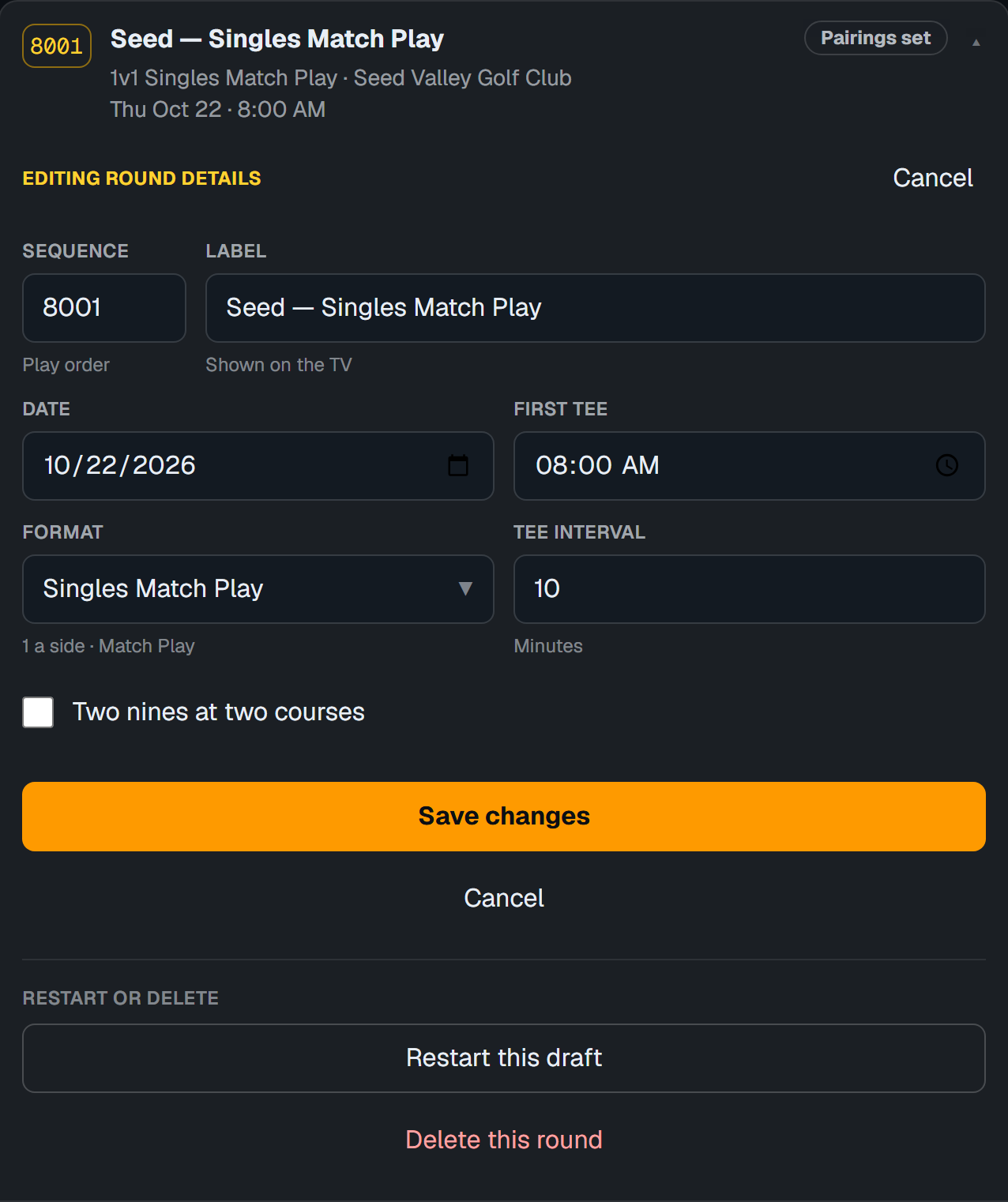
Saving closes the round, and its row shows a green ✓ Saved that fades after about four seconds. Setting a course, starting the draft and restarting it close the round the same way. A save that is refused leaves the form open, with the reason at the top of the screen.
Sit-outs and the tee sheet
Setup → Sit-outs is per round, not per trip. Active on the players screen means "not on this trip at all"; a sit-out means "not playing this round", which is what lets an odd roster rotate who sits rather than benching the same person every time.
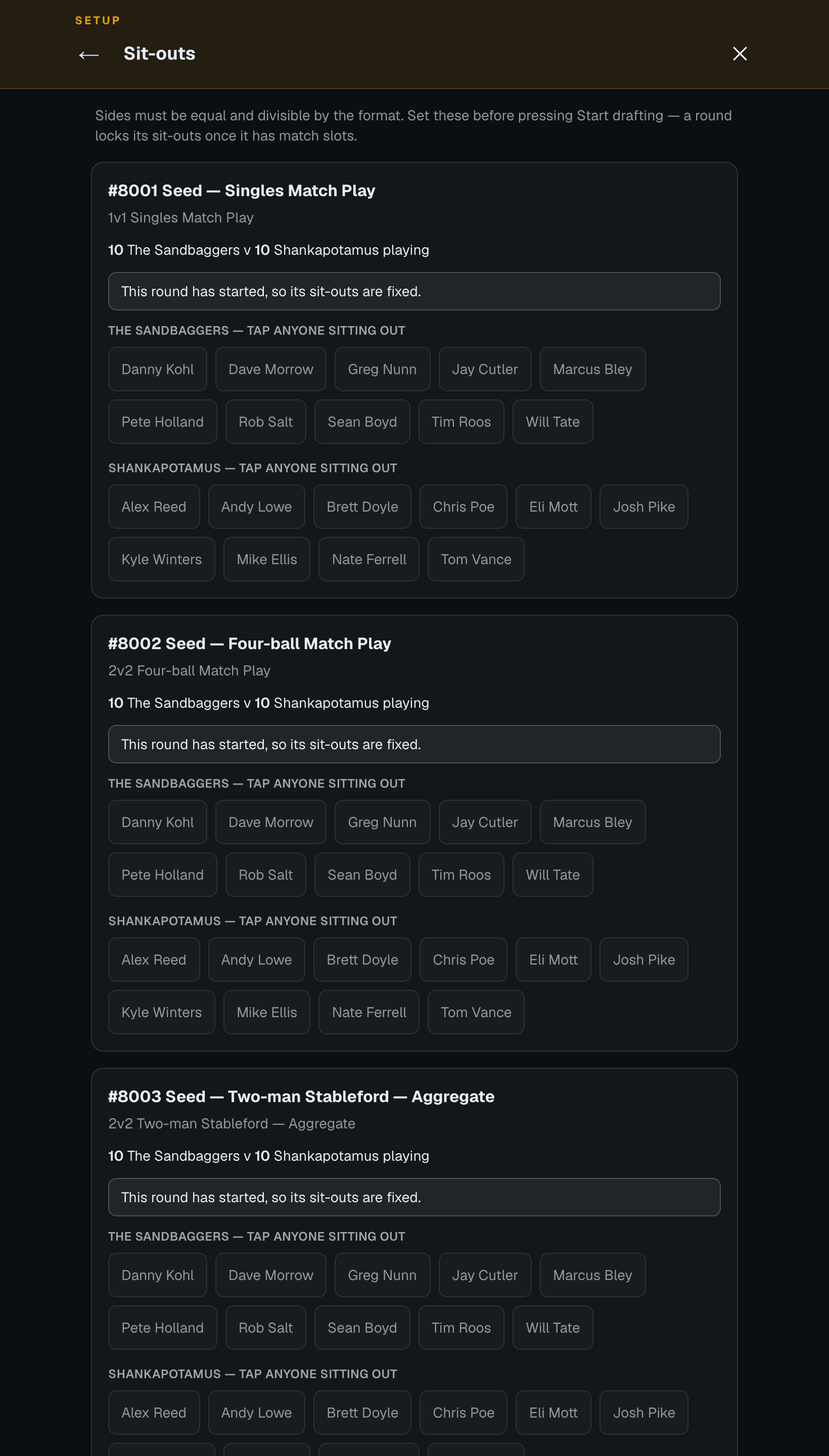
Sides have to come out equal and divisible by the format — 10v10 or 9v9 for singles, 10v10 or 8v8 for two a side. The screen shows a live count and warns you before the arm button refuses.
Sit-outs freeze once a round has been started. So does the roster. This is deliberate: the number of matches in a round is derived from who is playing, and changing that underneath a live draft produces a round that can never be finished.
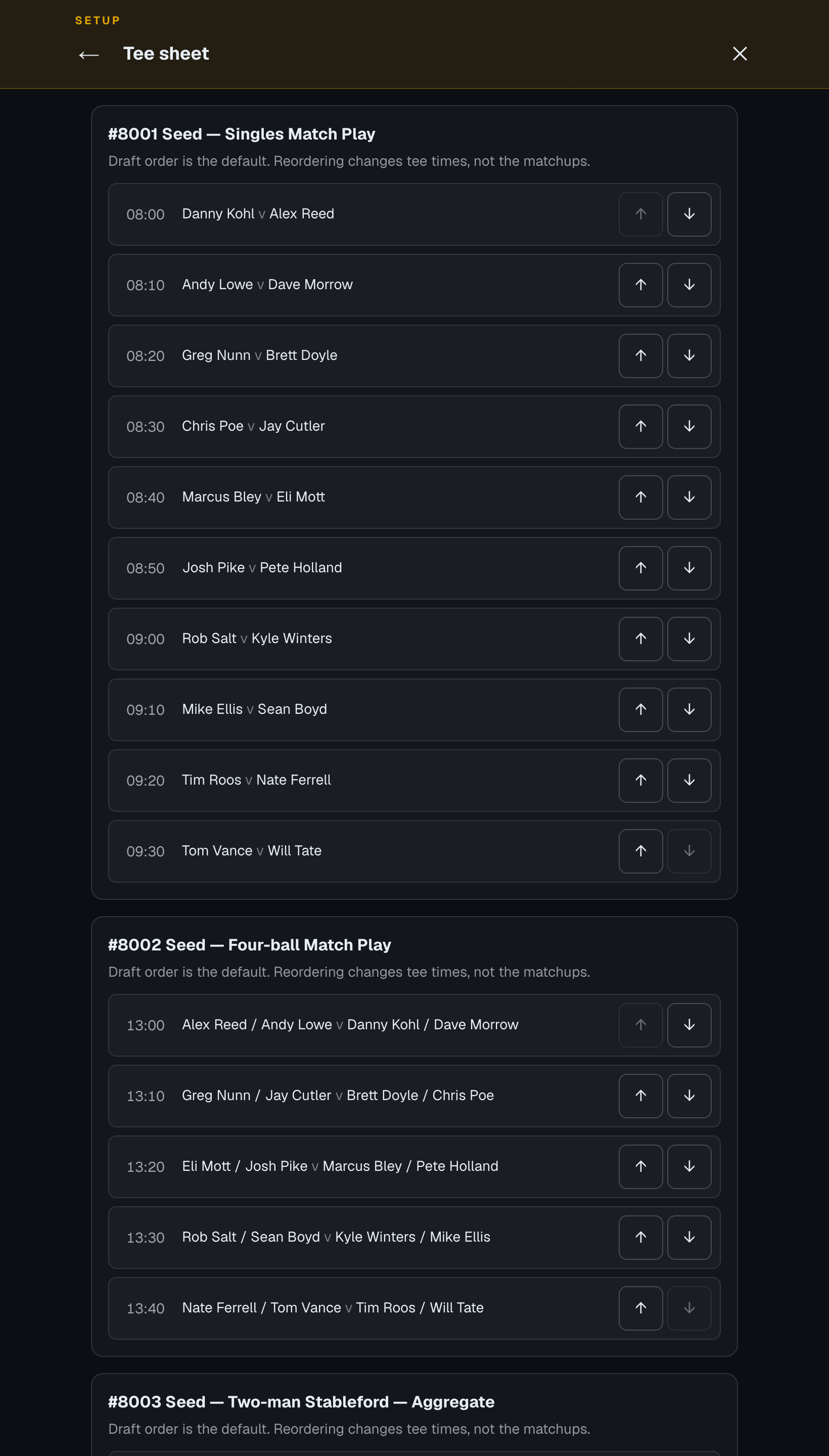
Setup → Tee sheet reorders who goes out when, without touching draft order. Draft order is immutable; the tee sheet is a view on top of it. Once a round is drafted, every list of its matches follows the tee sheet — the TV's Board and Scorecards, the phone's Board, the Card tab and Points — and "Match 1" is the first group off. Only the draft itself goes in draft order.
4The draft
The centerpiece. Two captains, on their own phones, building a round's matchups head to head while a television shows the room what is happening.
Starting it
Open the round: under its details is one amber button per team, each marked with a dot in that team's color. Tap the one that won the coin toss.
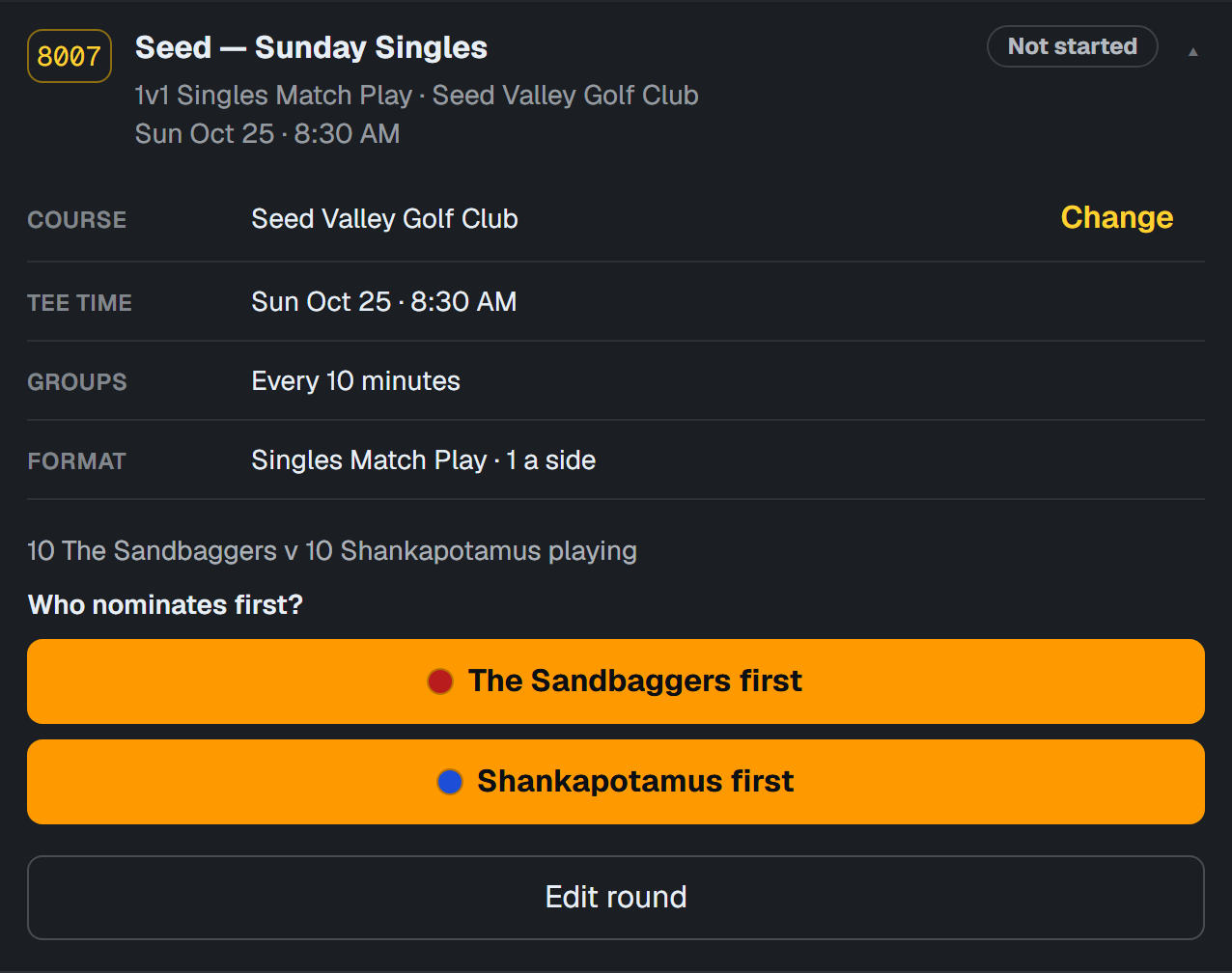
It asks you to confirm before it commits, and says why:
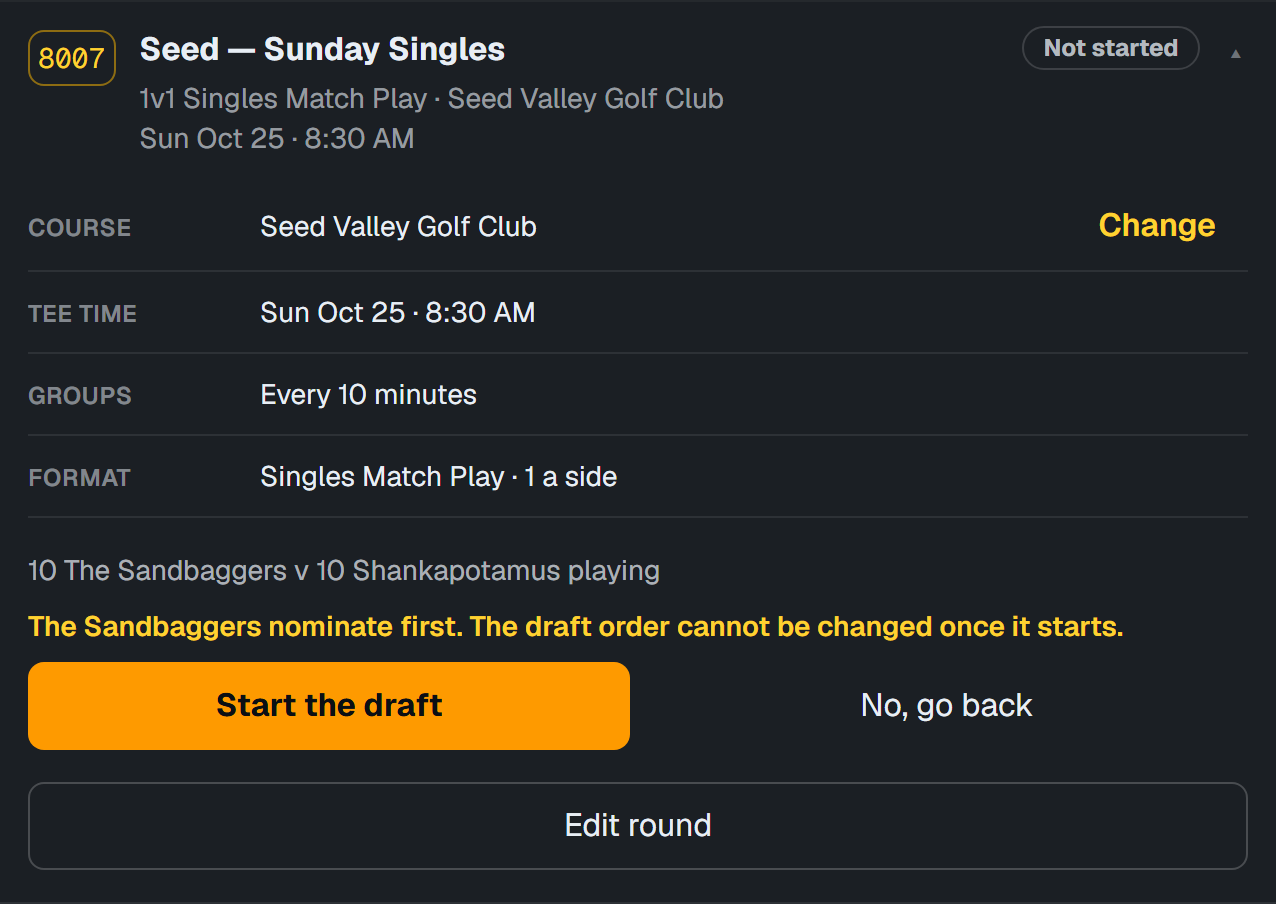
Draft order cannot be changed once the draft starts. A mis-tap here costs a full re-draft, which is why there is a confirmation step at all.
If it refuses, the message says exactly what is wrong — uneven sides, another round still drafting, or a round that was already started.
Captains don't need to go anywhere. When the draft starts, a captain's phone moves itself to Pick, and back to the Board once the last matchup is set — a rehearsal's draft too, so a captain watching one on the Board is taken to Pick. The commissioner is never moved, and never picks at /pick, which only lets them watch: both sides of a rehearsal are picked from Setup → Demo & rehearsal (§9).
Drafting
The rhythm is nominate → hand over → answer → reveal. Twenty beats in a singles round, ten in two-a-side.
The nominating captain puts up a player (or a pair). That becomes public the instant it is confirmed — the TV shows it immediately, and that is the point: the room reacts to who has been put up before it sees who answers.
The answering captain then gets this:
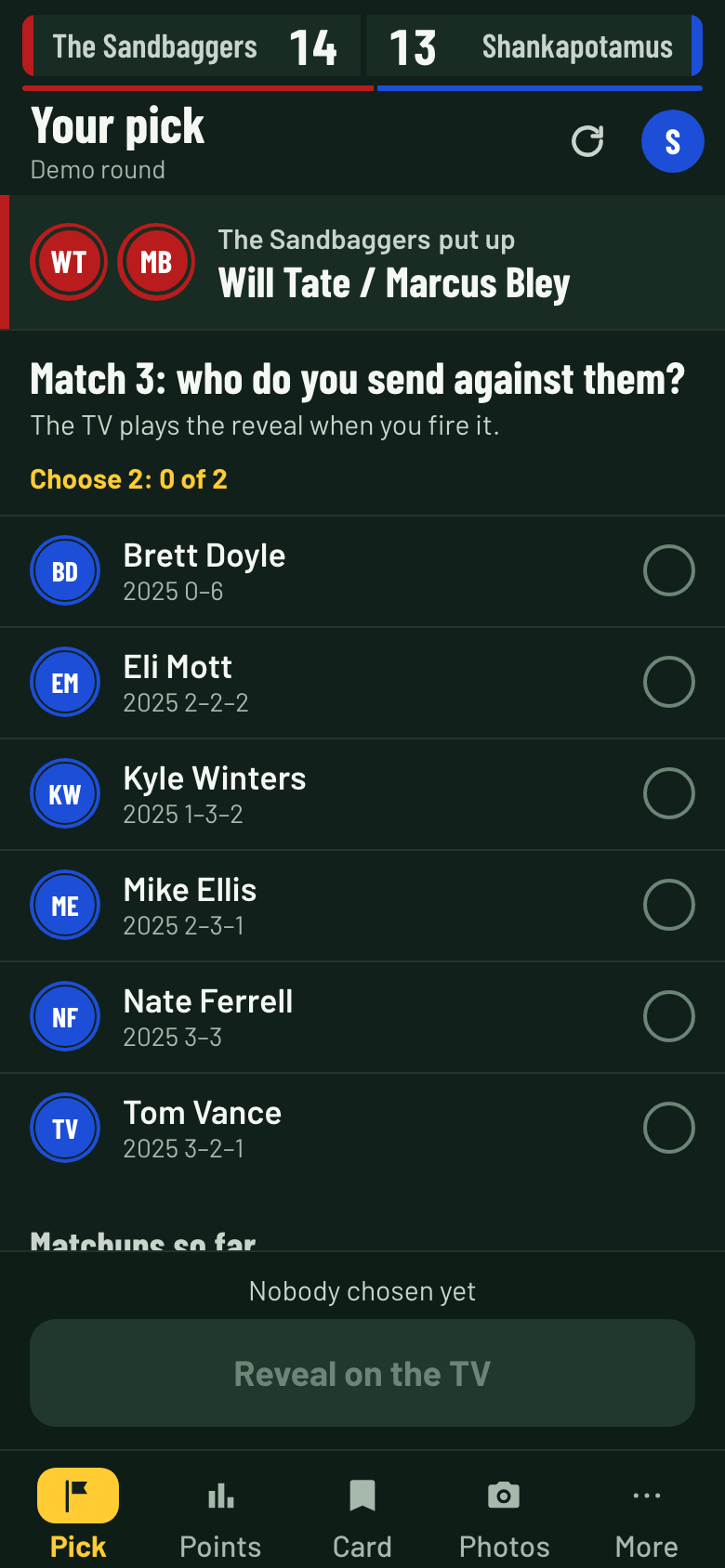
Who they are answering stays pinned at the top: "Ballers put up", with faces and names. The list below is everyone still eligible, each with their face and their record across every trip: the format being drafted first ("2v2 5–2–1"), then overall. A chosen row fills with the team's color, and the button at the bottom stays dim until the pick is complete, then turns yellow. Reveal on the TV fires the animation.
Nominating is the same screen without the callout, and its button says what happens next: Lock in: it goes on the TV now. Then, while the other captain answers, the screen says what you put up, with faces, and updates on its own. Matchups so far sits under every state, open.
Partners once. Two players may be partners on the same side only once on the trip. In a two-a-side round, the first player a captain taps anchors the pair, and every teammate who has already partnered that player dims, with the round they played together in yellow in place of their record ("Partnered with Al Moreno · Thu AM"). The screen also looks ahead: a partner who would leave the rest of the team no way to pair up without a repeat dims too, marked "Leaves a repeat pair later". Tapping a third player swaps the partner and keeps the first pick; untap the first pick to change it. If a repeat ever becomes unavoidable, the screen says so and leaves open only the pairs with the fewest repeats, so the round can always finish. The server applies the same rule, so a stale tab cannot record a repeat either. Rehearsal pairs never count. The commissioner can take a round out of the rule on Edit round (Skip the partners-once rule): its pairs no longer count against any other round, and its own draft ignores earlier pairs.
An answer is never readable early — it is written to the database in the same statement that reveals it, so there is no window in which somebody could peek.
On a spectator's phone
Everyone else follows along at /watch — the Board tab — which needs no code:
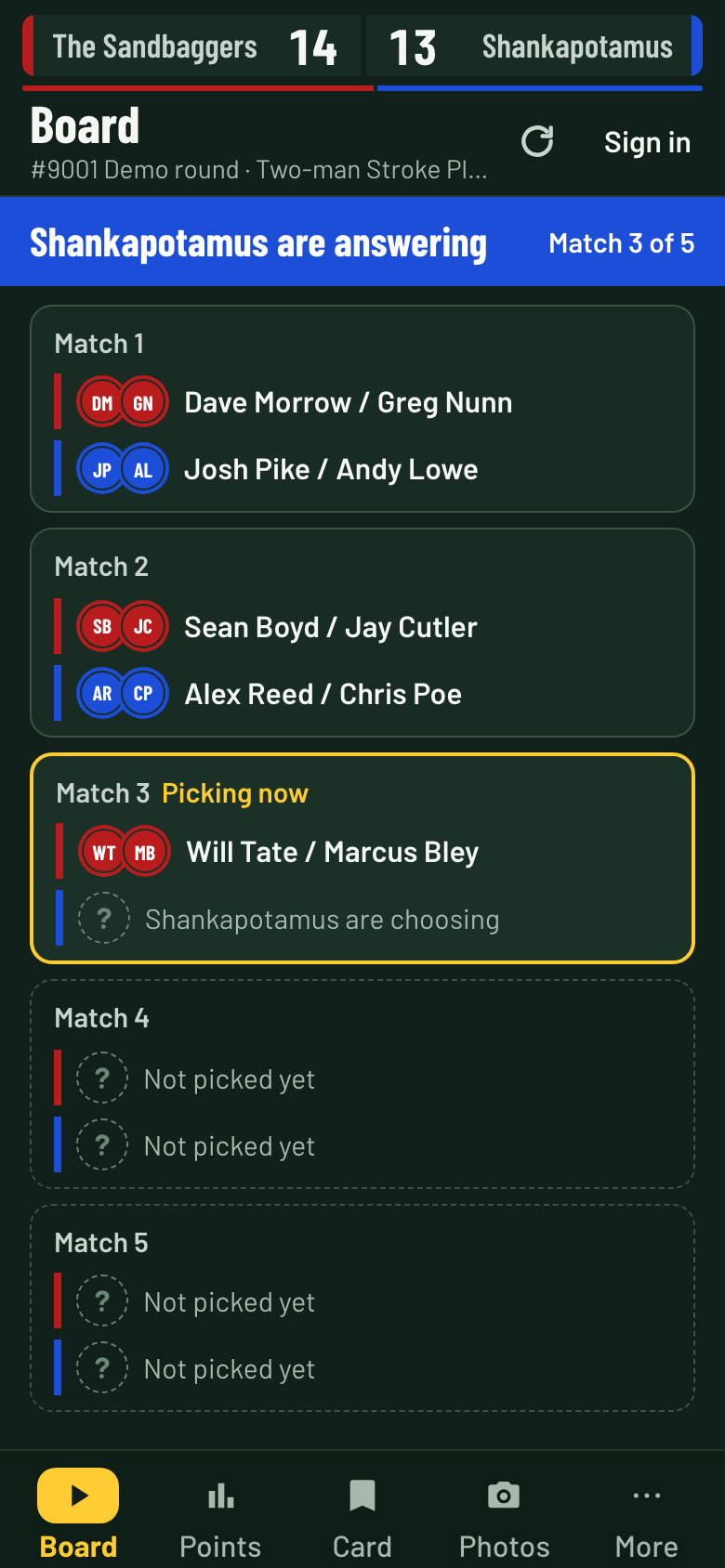
Same information as the television, laid out for a phone. A banner in the color of the team on the clock says what it is doing — "Oceans are answering", "Ballers are putting up" — with "Match 3 of 5" beside it, and "Draft complete" once the last matchup is set. Below it, one card per matchup: the ones already set are solid; the one being picked has a yellow border and Picking now, with "Oceans are choosing" on the side still to come; and the ones not reached yet are dashed.
The reveals play as full-screen takeovers, as on the television: who was put up, with faces, then a wheel for each answering player, and each player's face appears as their wheel lands. With reduce motion turned on in the phone's settings, the title card, "The pick is in", still shows for its four seconds, only without the movement.
On the television
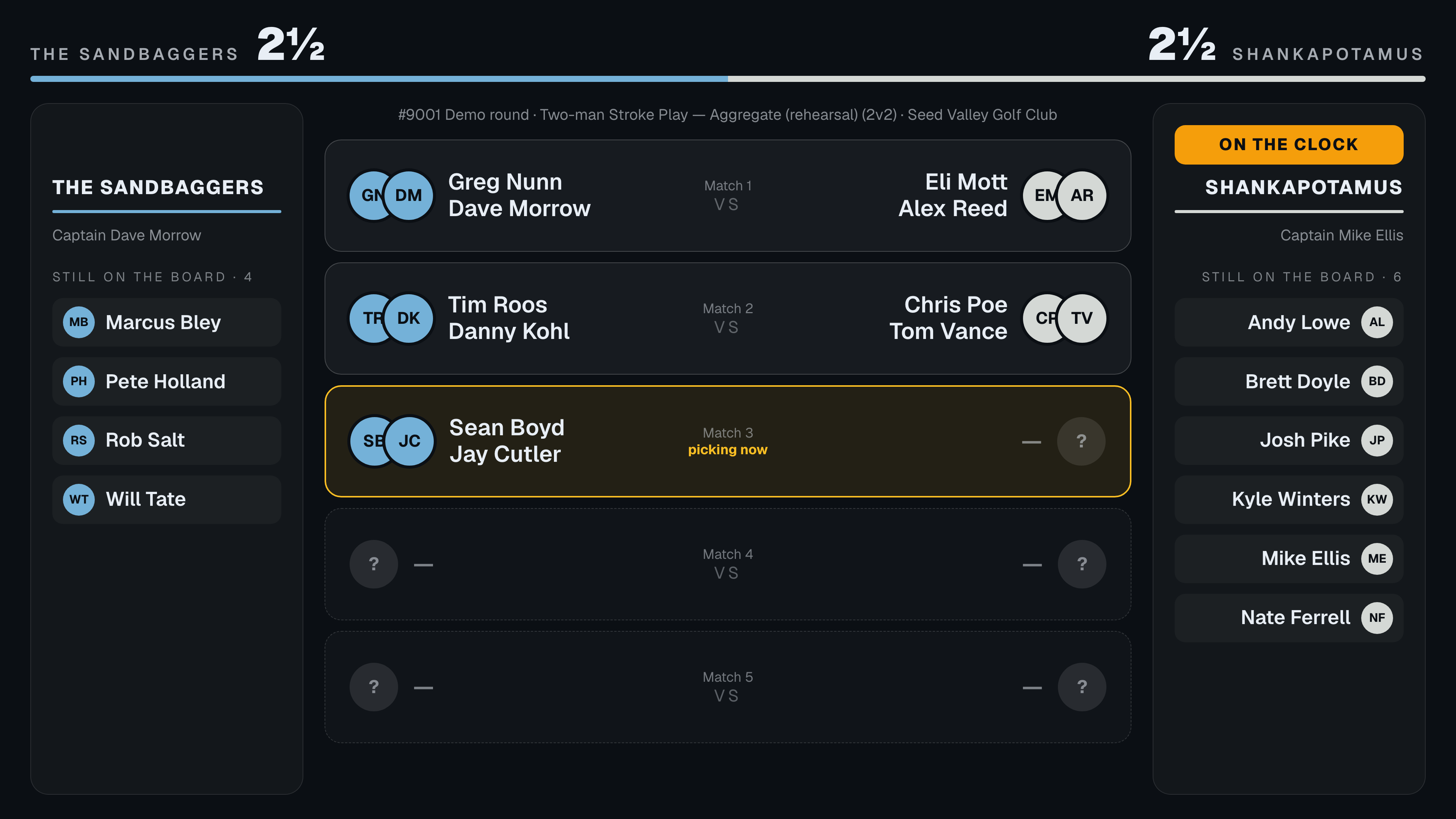
Across the top is the trip score: each team's total at its own end — its logo where it has uploaded one, its name where it has not — the leader's total in yellow, and a bar under both split by the totals. A rehearsal's board shows the real trip, since rehearsals count for nothing.
Each team has a card down its own side: its name over a stripe of its color, its captain, and STILL ON THE BOARD with a count and a face for every player it has left. ON THE CLOCK sits at the top of the card of the team that owes a pick.
Between them, under the round's name, is a card for every match. A finished matchup shows both sides' faces and names; the match being picked has a yellow border and says picking now; a match nobody has reached yet is dashed, with question marks where the faces will go. Each card says which match it is, and its tee time when the round has them.
The last matchup of a round involves no choices — one player or pair remains per side, so it is forced. The reveal says LAST TWO STANDING or LAST FOUR STANDING and skips its spin rather than pretending to choose.
A reload never replays the night. A TV or phone that just connected renders the current board statically and animates nothing.
If a draft goes wrong
Both controls for this sit below the round's edit form — open the round and tap Edit round — so the everyday view of a round has nothing destructive in it. Tapping either one replaces the form with its confirmation.
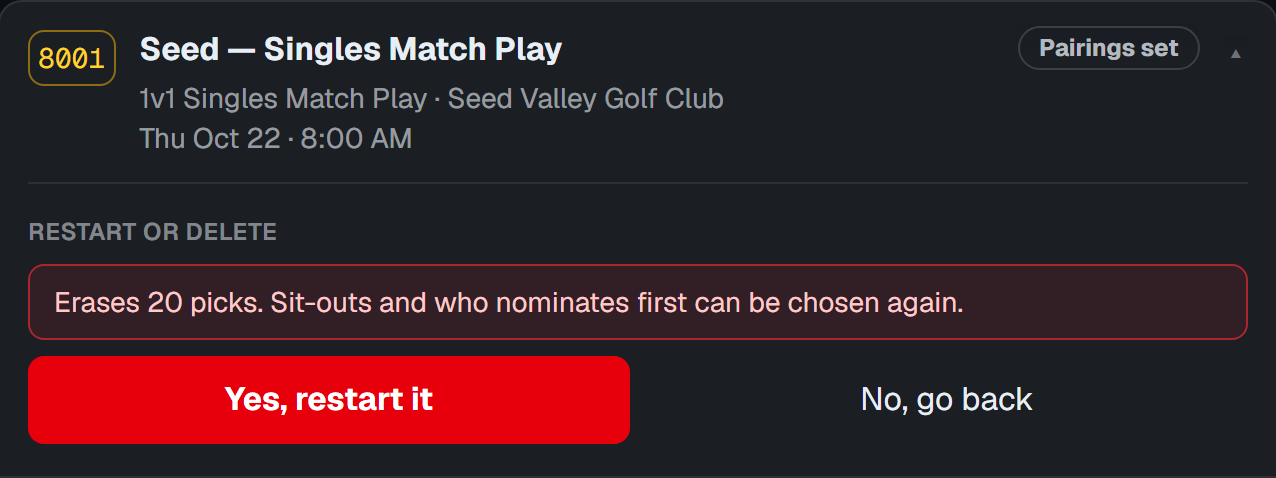
Restart this draft throws every pick away and returns the round to unstarted, so it can be run again. Sit-outs and who nominates first can then be chosen afresh.
Delete this round removes the round outright — row, matchups and results.
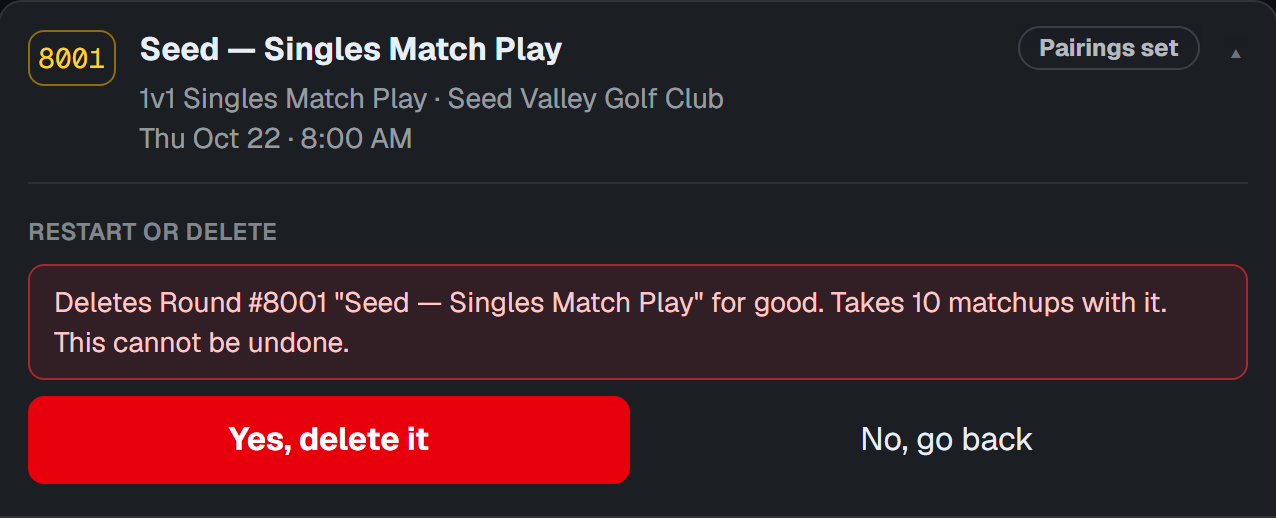
Both confirmations count what they are about to destroy and say so. The delete additionally checks that the count it was shown still matches reality before it writes anything: a tab left open through a whole draft can still be showing "nothing has been drafted yet" for a round that has since been drafted and scored, and the app refuses rather than acting on a stale picture.
5The television
/tv is a single URL that shows one of seven views, chosen from the commissioner's phone at Setup → TV display. There is no remote and nothing to type — bookmark /tv on the stick once and drive it from your pocket for the rest of the trip.
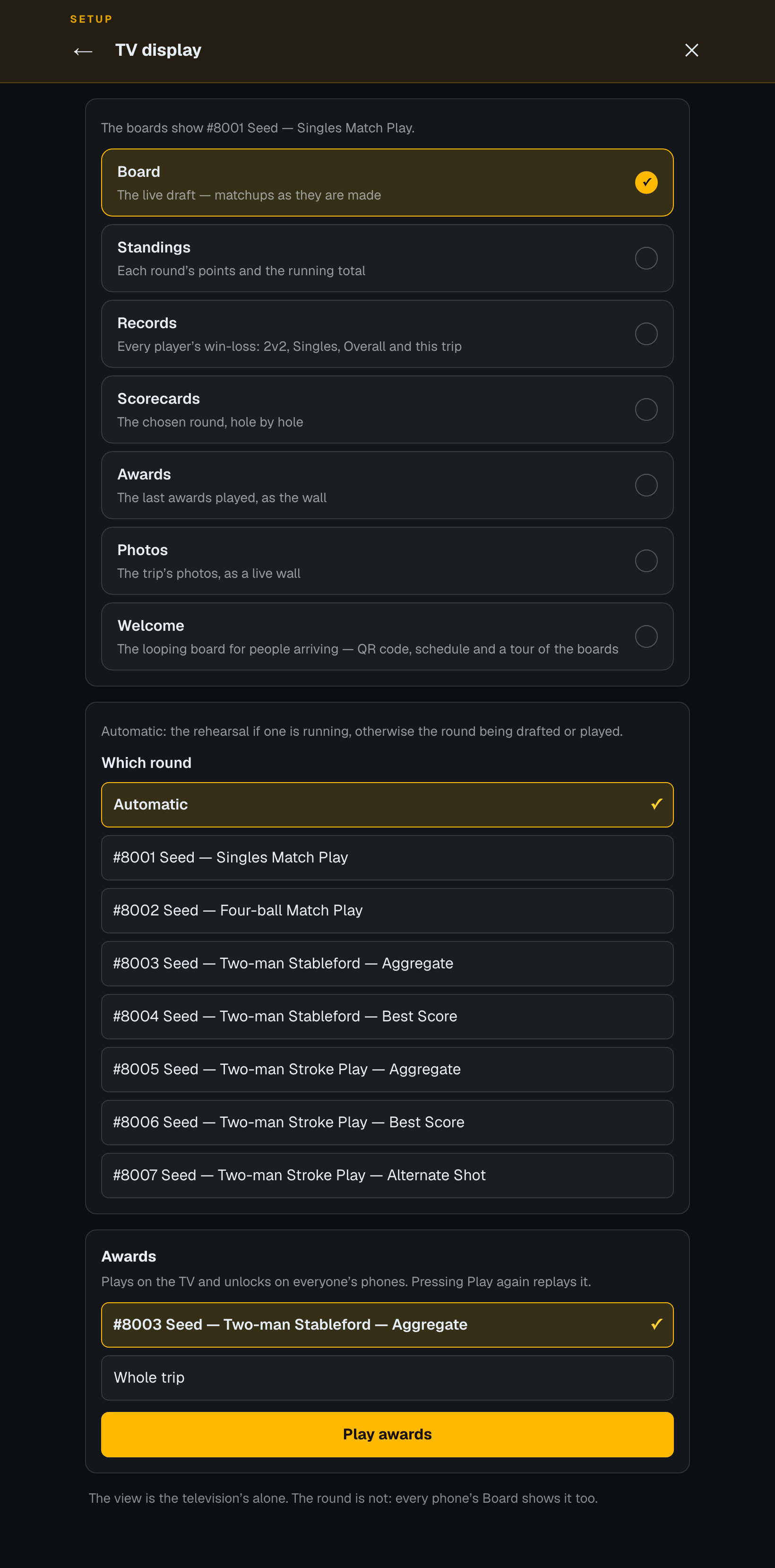
The view is the television's alone. Which round is not: the round chosen there is the one the TV's Board, its Scorecards and every phone's Board all show. Left on Automatic, that is the round armed for its draft, then a rehearsal if one exists, then the earliest round still being played. A pinned round stays until you choose Automatic again, or until a round is armed for its draft, which puts every board back on Automatic so the draft is never played behind an old pin.
Board
The draft, as above. Once the last matchup has been revealed, the side cards go and the board becomes the round's scoreboard, under the same trip score:
- Under the trip score: the round's name; the round's own score, with This round over it; the team that has won the round once it is decided, or Round tied; and the momentum bar (Streaks, below).
- One card per match, full width. The side ahead is filled in its color, with its margin at the outer edge — "10 SHOTS", "+3" — and a halved match shows ½ at both ends. The middle column says the tee time before a match starts, THRU 14 while it is played, and F once its result is confirmed.
The scoreboard leaves the captains off; they are on the draft's side cards, Points and Players.
Welcome
A looping eight-panel board for people arriving at the house. It runs about fifty seconds a lap.
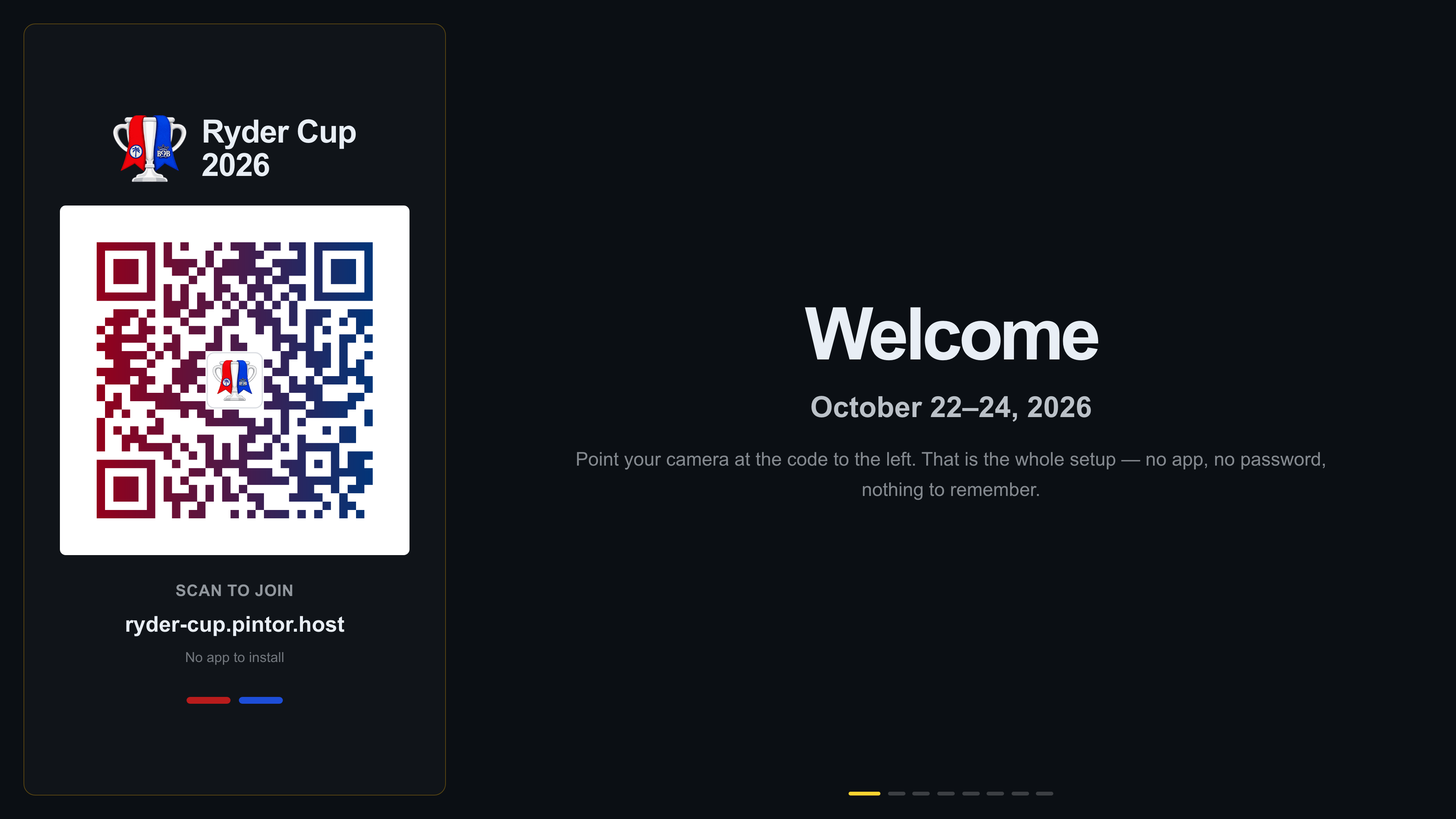
The QR code stays in the rail on the left through every panel, under the trophy and the trip's name. It is sized to be scanned from across the room — about eleven inches wide on a 55" panel, which reaches about eight feet.
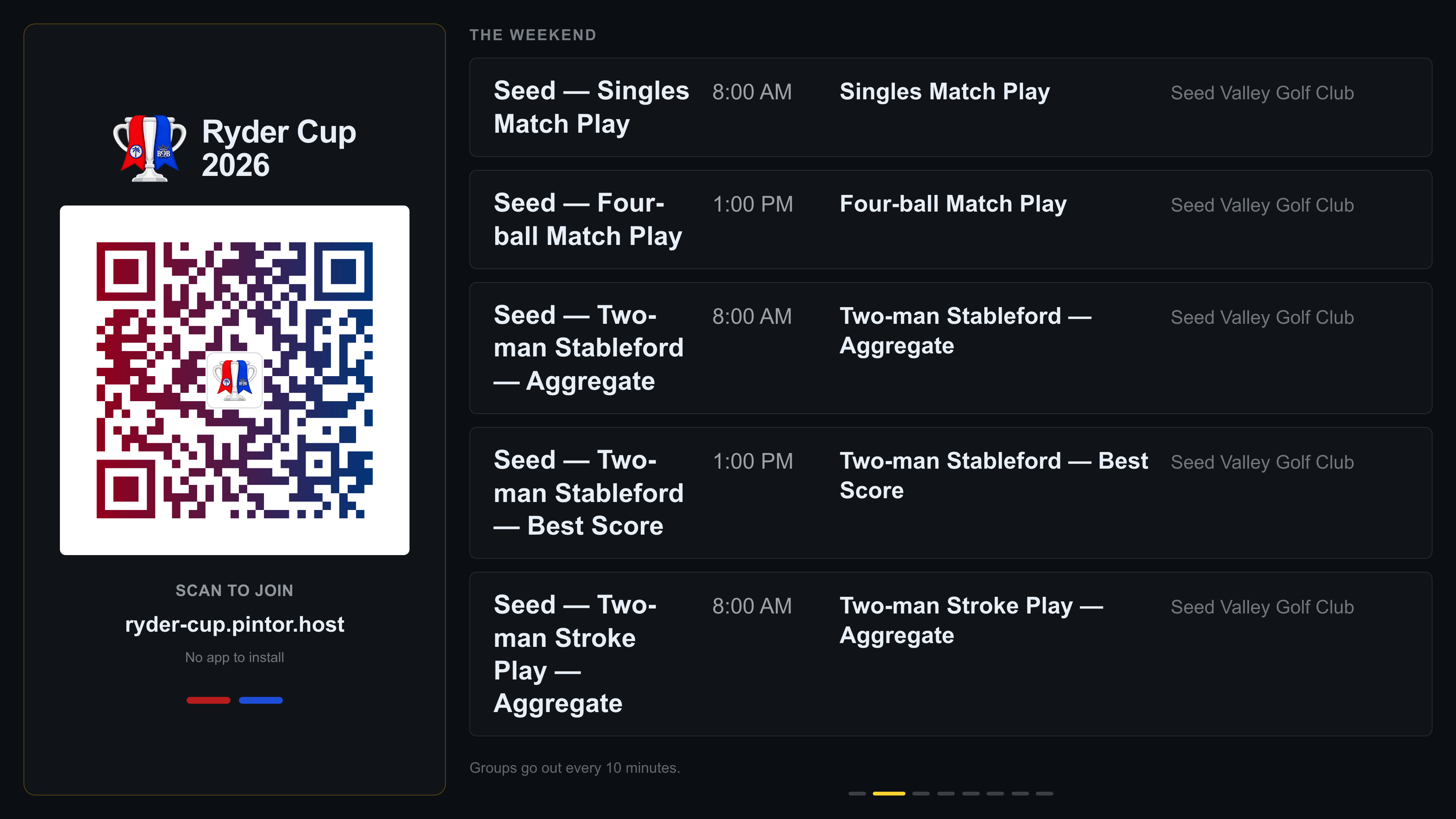
The itinerary draws one row per sitting, not one per round, so a round split across two afternoons appears on both. If the schedule is taller than the screen, the list crawls like film credits — a television has no scrollbar, so a row past the fold isn't "below", it's unseen.
Three of the eight panels teach the scorecard — empty, mid-round and finished — using the real entry card driven by a scripted round rather than a mock-up:
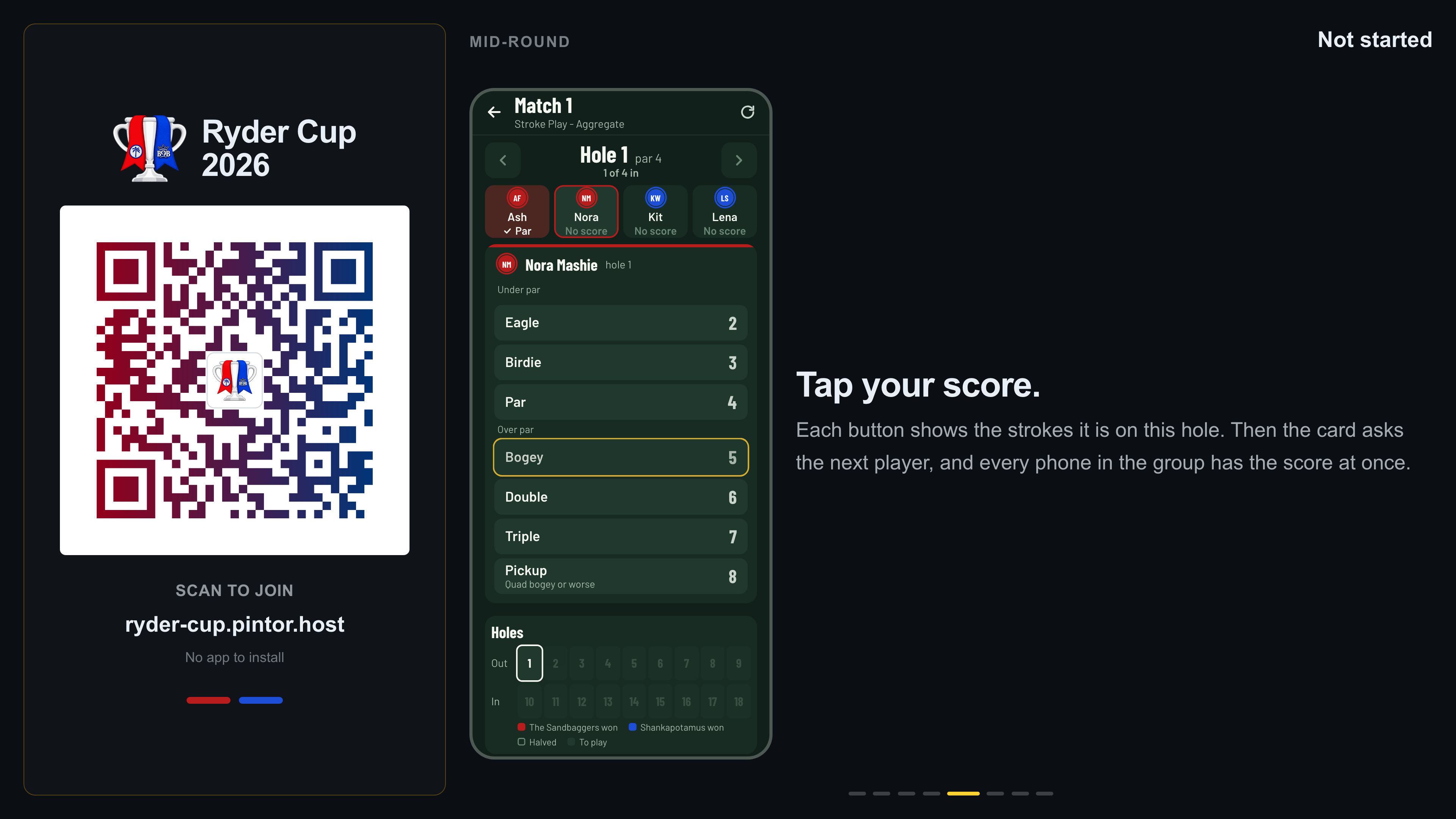
The yellow ring shows what is about to be tapped, so the screen doesn't appear to score itself.
The demo panels show the trip's own teams — their names, colors and logos — with invented players, and the scorecards panel plays Saturday as singles stroke play, scored so the streak marks and the momentum bar all appear.
Standings
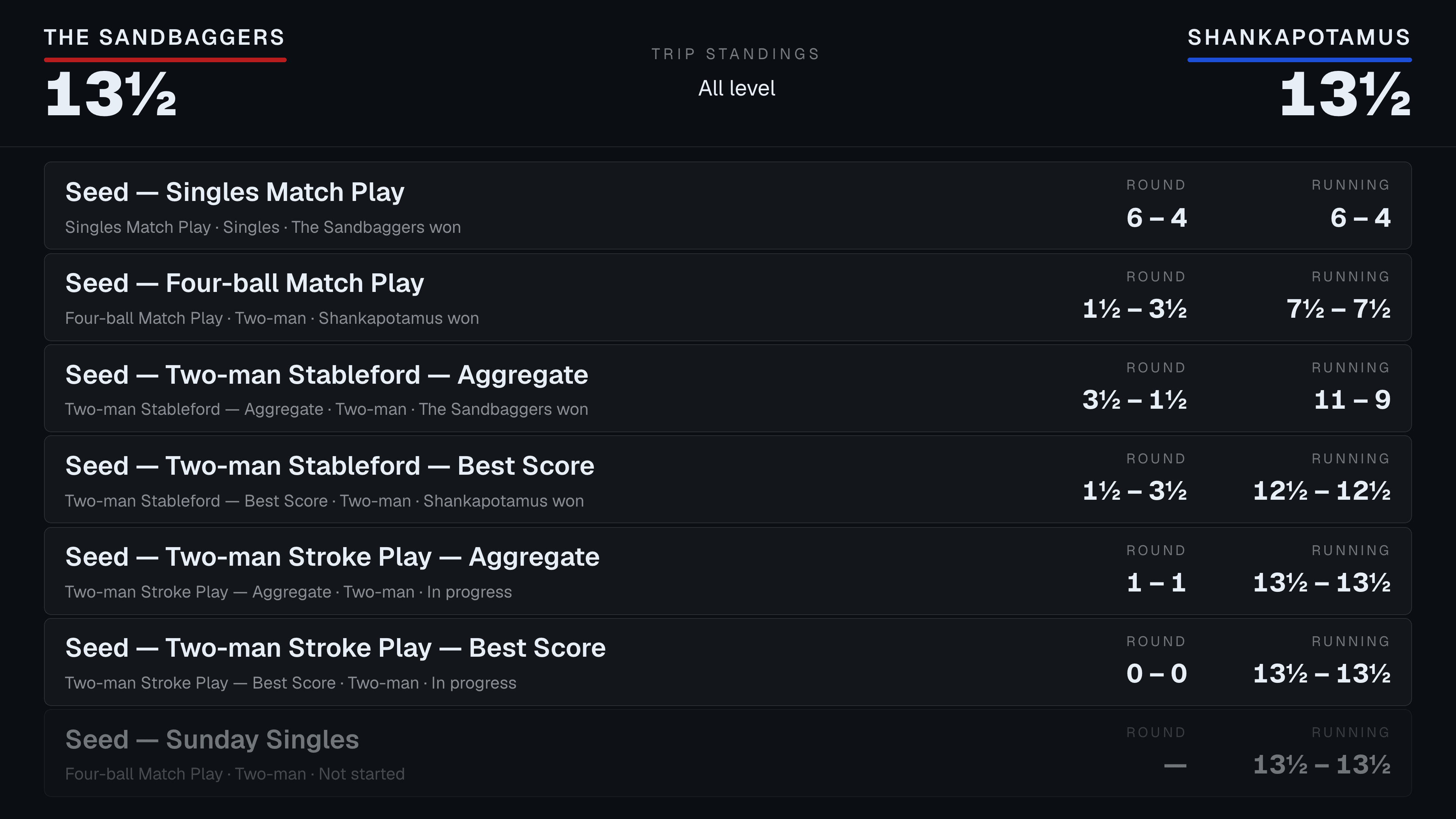
Each round's own points beside the running trip total.
Records
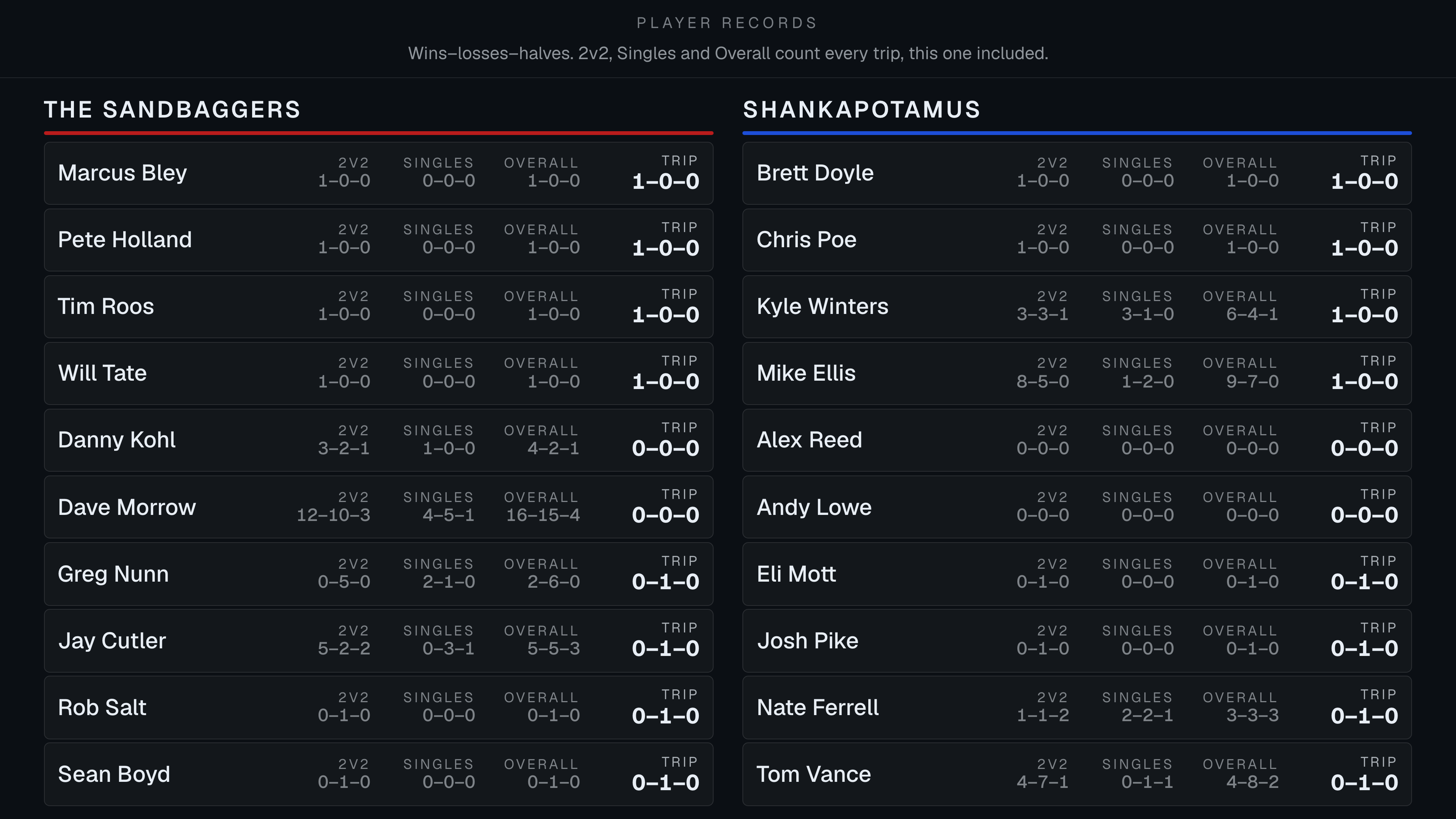
Every player's record for this trip, and across every trip — 2v2, Singles and Overall, each the past trips entered at Setup → Players plus this trip's results.
Scorecards
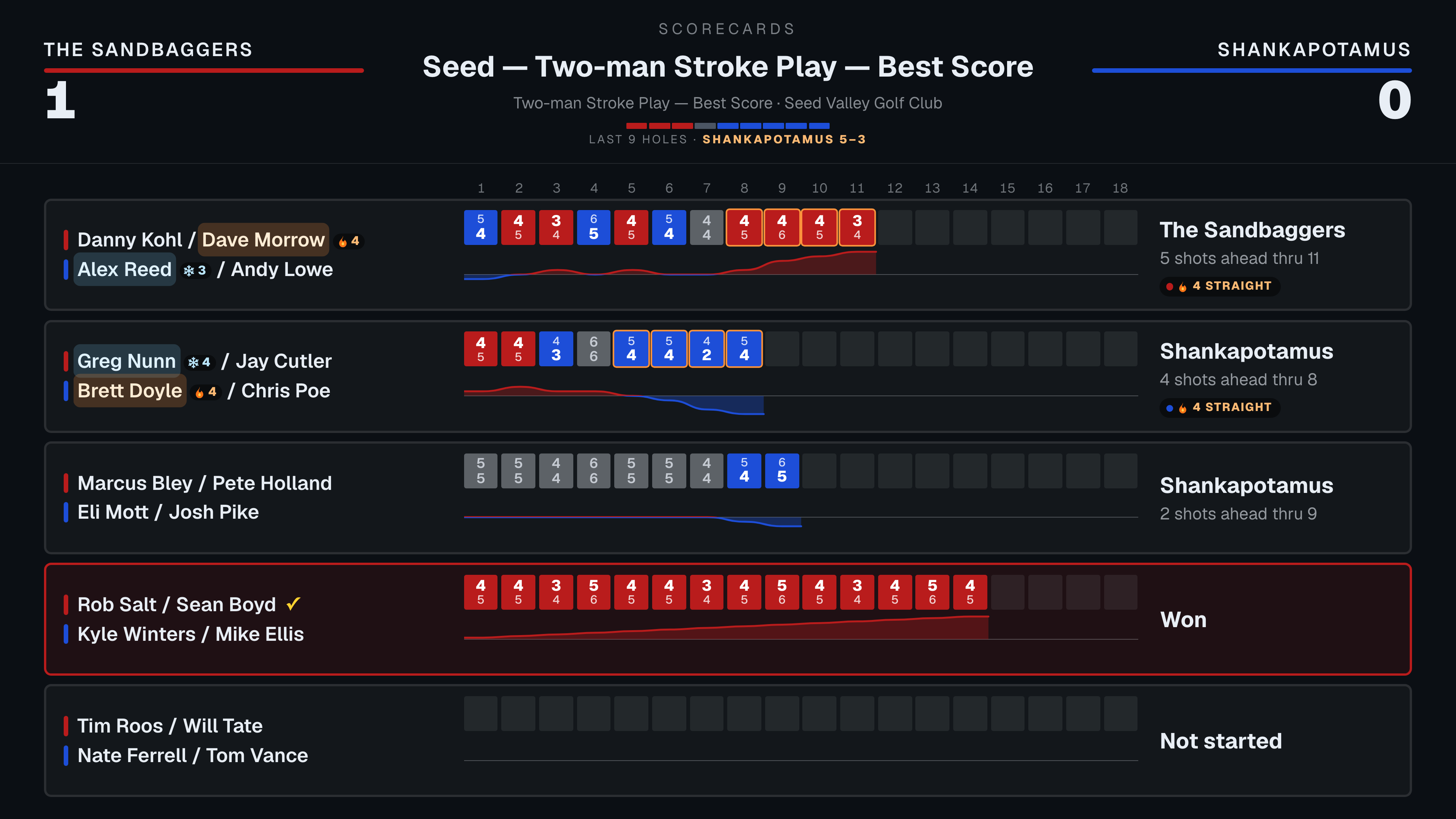
One row per matchup, the ones being played first, then the ones yet to tee off, then the finished ones. Each row has eighteen boxes, and each box says how far ahead somebody is after that hole: filled in the leader's color with the shots (or points) they lead by, an outline with a 0 when it is level, empty until the hole is played. Read along a row to see the match — where it turned, how far it got away — and the last filled box is where it stands now. When a hole is scored while the TV is on, its box flips in like a number plate hung on a leaderboard.
Above the boxes are the hole numbers and, once the round has a course, each hole's par, with a gap between the front nine and the back. Beside each side's names is its own score: against par in stroke play (+3, E, −1 — an aggregate pair is measured against par for both players), or points in Stableford. Match play shows neither. The momentum bar in the header still shows each live match's last three holes and who took each one.
Up to five matches fill the screen. A round of more — a singles round of ten — draws smaller rows that all fit on a television; on a screen too short for them they scroll slowly on their own, holding on the top rows, crawling to the last, holding, and gliding back. It shows the same round as the Board: pin one under Which round, or leave it on Automatic.
Streaks
Once a round is drafted, the board, the scorecards view and the phone Board tab mark what is running hot or cold. Nothing is stored: every mark is worked out from the holes each time the screen draws, so correcting a hole simply redraws it.
- A flame chip,
3 STRAIGHT— a side has won its last three holes or more. A halved hole, a lost hole, or a hole left blank behind a later one ends the run. On a phone it is "3 straight" at the end of the side's line. On the scorecards view and the phone, the run's holes are ringed as well. - A flame or a snowflake with a number, on a band with a player's name — that player's last three holes or more were all better than bogey (par or better), or all worse than bogey (double or worse). The band is warm for hot and icy for cold, and a long name shortens before the mark does. On a phone the mark is a small badge under the player's face. A bogey is the neutral hole and ends either kind of run. Stableford and stroke-play rounds only: match play records who won a hole, not what anybody shot, and a stroke round needs its course's pars.
- The momentum bar under the score — each live match's last three holes, one segment each: each team's own color from its own side, halved holes as a short dash in the middle, with the leader named beneath. The caption counts every hole on the bar, so with three matches live it reads "Last 9 holes: Ballers 5–3" on a phone.
A mark shows only on a match with no recorded result, so a match that has closed out keeps its marks until somebody confirms it. Recording the result — Confirm on the card, or the quick way — clears its marks and takes it out of the momentum bar.
Awards
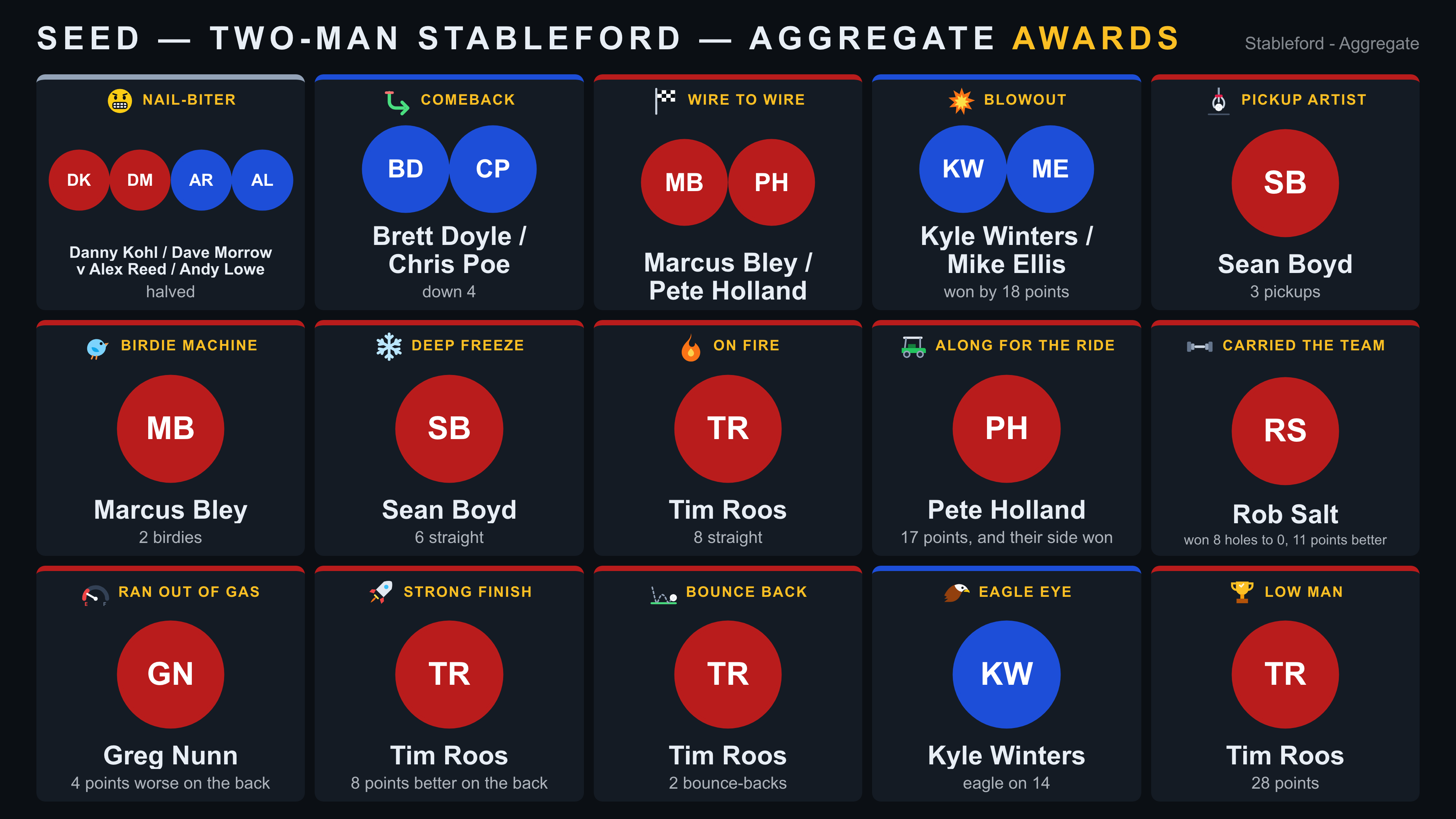
After a round, the television can put on an awards show. Every award is worked out from the scorecards — nobody enters anything — so a hole corrected afterwards corrects its award too.
- Starting it. At Setup → TV display, the Awards section lists every round whose matches all have a result, plus Whole trip once one real round has. It starts on the latest real round. Pick one and press Play awards: the remote says Playing on the TV. and moves its view to Awards.
- What the TV does. A title card, then each award for about eight seconds — its name first, then the winner's photo, the figure ("5 straight", "down 3"), the evidence (the holes that did it, the two nines, both partners' totals, or the match's swing) and who came close. An award says only its figure: Wire to Wire's name says the rest, so it has no figure line. When two or three share an award, each gets a row of their own, with their photo, name and their own evidence, and a figure they all share is said once, above the rows ("halved", not "halved · halved · halved"). Then it settles on a wall of every award and stays there. On the wall a tied award gives each winner a name line, and on the wall and the reveal every player's photo has their own team's color; a halved match is red and blue. A reload lands on the wall; pressing Play again replays the show, and switching the TV to another view ends it. The Awards view button shows the latest wall without replaying it — the way back to it after the draft.
- On the phones. The moment Play is pressed, that round's awards unlock: a gold banner on the Board opens the Awards page until the next draft starts, and More → Awards always does. Phones never play the show; they would compete with the television.

On the phone the awards are one list: each award's name, big, its figure in a chip beside it, then the winners with their faces and the evidence, and who came close. A tied award gives each winner their own evidence, and a figure they all share is said once, in the chip.
The Awards page opens on the latest awards played. A switch along the top has every round whose awards have been played, and Whole trip once the trip's have. A link to awards nobody has played yet opens the latest instead, so a link cannot spoil the show.
The awards. Per round: Birdie Machine, Eagle Eye, Low Man, On Fire, Strong Finish, Bounce Back, Carried the Team, Pickup Artist, Deep Freeze, Along for the Ride, Ran Out of Gas, Blowout, Nail-Biter, Comeback and Wire to Wire. The whole-trip show keeps the seven that add up across rounds of different formats — Birdie Machine, Eagle Eye, Low Man, On Fire, Deep Freeze, Bounce Back and Pickup Artist — and adds Perfect Record (won every match) and Winless (won none), each over two matches or more.
How they are decided, briefly:
- A Stableford round's awards go by points: the most points wins. Low Man, Strong Finish, Ran Out of Gas, Carried the Team and Along for the Ride rank and print points there, so an eagle (8) counts for what it scored. Low Man goes by the most points a hole, so a group that stops early isn't penalized ("44 points through 14" beats a full round's 54); over a full round that is simply the most points. A stroke-play round ranks these awards in strokes against par, and the whole-trip show ranks against par too, because that is the only way to add a Stableford round to a stroke-play one. Birdies, eagles and runs are the same rungs in every mode. A pickup is the card's last button: Pickup in stroke play, and Triple or worse in Stableford, so there a holed-out triple counts toward Pickup Artist, and the whole-trip figures count it as three over par.
- Only holes every player in the match has reported count. A match-play round records who won each hole, not what anybody shot, so it gets the match awards only; a stroke-play round needs its course's pars.
- Low Man ranks per hole played, so a group that stopped early can still win it, and the line says so: "36 points through 14". A player needs half the holes (nine of eighteen) to qualify.
- Carried the Team is for two-a-side rounds: the partner who beat the other most, hole by hole. Each hole counts for up to two either way — beating your partner by one is worth 1, by two or more 2 — so one bad hole can't decide it: "won 5 holes to 1, 11 shots better".
- Along for the Ride is the worst card on a side that won its match, by the recorded result: "95 (+23), and their side won". It goes by the score a hole, as Low Man does, and needs nine holes. The two are decided separately, so they often name different pairs. Alternate shot has neither, since its partners share every score.
- In alternate shot, both partners are credited with the team's score on every hole, so they share the hot and cold marks and both count the team's birdies toward their own awards. Partners always tie with each other, so when they share the same figure and the same holes an award names them as one pair ("Danny Kohl / Dave Morrow"). Two teams tied for an award are still four players, and that award is skipped for the round. On the whole-trip show partners are named as a pair only on a run from the round they shared a ball in; records and counts stay separate winners.
- Ties are shared by up to three; with four or more, the award is skipped that round. Most awards also have a minimum — two birdies, a three-hole run — before they appear.
- Match awards count only matches whose holes agree with the confirmed result. A result the holes do not bear out — recorded the quick way after fourteen holes of a Stableford round, say — has no true margin, so it sits out Blowout, Nail-Biter, Comeback and Wire to Wire. Its players still count for everything else.
- A rehearsal never counts toward the trip's awards, but it can play its own show. Once Play the round at Setup → Demo & rehearsal has finished a rehearsal, that screen's Awards plays its show, and Play awards at Setup → TV display offers it too, labeled "(rehearsal)", so the reveal can run on the television before the first real round (see §9).
Photos
The trip's photos as a live wall — see §8.
Rehearse on the television you will use. Everything about
/tvis checked in desktop browsers and in an automated harness that drives Chromium and WebKit at real window sizes and a television's, and it has run on a real television. The Fire TV Stick in the rental house is still the one that counts: rehearse on it before the trip — specifically a 2v2 round, whose double-spin reveal is the animation most worth watching in advance.
6Scoring
Two independent ways to record a result, and you can mix them freely.
/results — the Card tab — lists the rounds being played and the rounds ready to play, and under them the rounds that are finished.
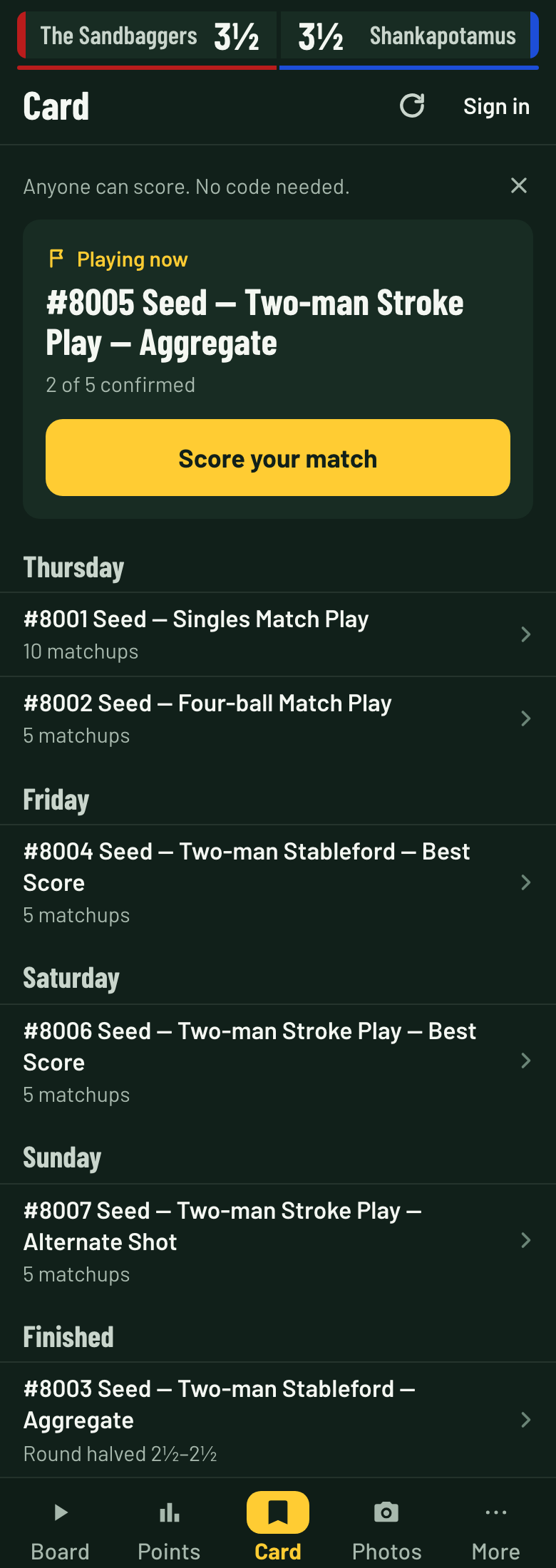
A tip at the top says "Anyone can score. No code needed."; its ✕ hides it for good on that phone. A round being played sits above the rest in a Playing now panel, with a yellow Score your match that opens its matchups and a line such as "3 of 5 confirmed". Below it, each round whose draft is done but which nobody has started scoring is listed under the day it is played — "Thursday", with the date added when two days share a name, and No date yet last — saying how many matchups it has. A rehearsal is tagged Rehearsal, and the round the TV is pointed at says on the TV.
A round appears once its draft is done; a round waiting for its draft, or being drafted, is not shown. Once its last result is in, it moves to Finished at the bottom, in order, saying who won with the winner's points first — "Ballers won 3–2" — or "Round halved 2½–2½". A finished rehearsal is there too, tagged. With nothing being played or ready to play, the tab says "No round to score right now. A round shows here once its draft is done.", and any finished rounds are still listed under it.
Open one and you get its matchups:
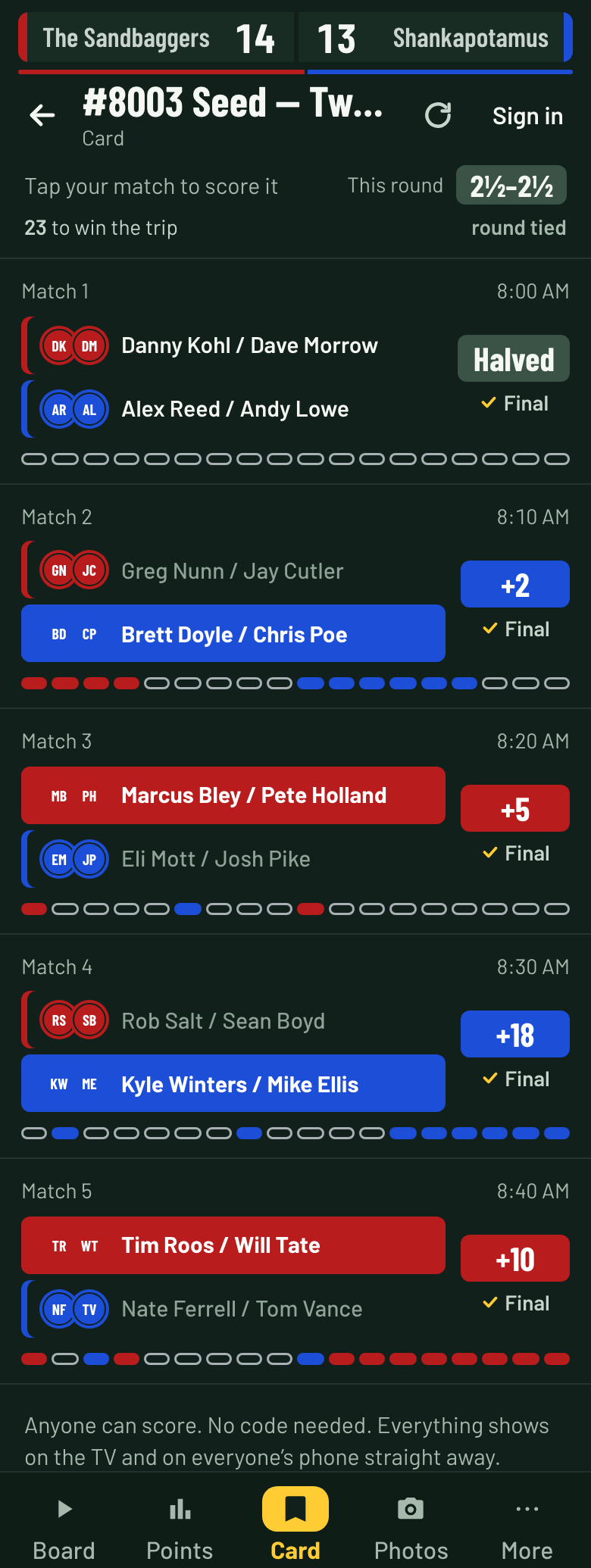
"Tap your match to score it", the round's score so far, then one row per match in tee-sheet order — Match 1 is the first group off, Match 2 the next — drawn like the Board's (below). If this phone knows who you are, from the name you tapped under Who are you? on the Photos tab (§8), your match moves to the top, flagged Your match in yellow. Under the list: "Anyone can score. No code needed. Everything shows on the TV and on everyone's phone straight away."
A finished round is read-only, except for the commissioner. Its matchups say "Final. Tap a match to see it." in place of "Tap your match to score it", without the line about who can score. Each card opens on the first hole played and shows the hole as it was recorded: the players' chips with their scores, and under them each side's faces, how its score was made ("Par 2, Birdie 4"), its total and who took the hole. The arrows step from hole to hole, as far as the last one played, and a tap in the grid opens that hole. A result recorded by hand has no holes, so its card opens on none and the chip at the top says the result. There are no score buttons, no Confirm and no Record the result without a scorecard. If the holes no longer match the recorded result, the card still says so (below). A hole this phone tried to send before the round was over is shown with Drop it, which clears it from the phone. Signed in as the commissioner, the matchups and the cards are just as they are while a round is being played, so a wrong score can still be fixed after the round is final. Only the screen changes: a score is still accepted from anyone, as it always has been.
The quick way
Tap a matchup, open Record the result without a scorecard at the bottom of its card, and tap who won: the buttons are the two teams' names and Halved. Changing a result somebody already recorded asks first — "Ballers won is recorded. Change it to Halved?", with Change it and Keep it — and Clear asks the same way. Tapping the result that is already recorded does nothing. So a stray tap cannot rewrite a score. Nor can a stale card: if another phone records, changes or clears the result while this card is open, a tap here or on Confirm is refused rather than written over it, and the card refreshes to show what is recorded, saying "This result changed on another phone, so yours was not saved."
This control stays on the screen permanently, underneath every scorecard — except a finished round's, for anyone but the commissioner. One un-scored match must never be unrecordable.
The hole-by-hole way
Tap a matchup and score it as you play. The card has the screen to itself, with no tabs and no trip score. Across the top: ← back to the round, "Match 4" and its format, and the refresh arrow. Under them, once the match is under way, its margin chip and the match in a line ("Ballers 3 shots ahead thru 11"). Then the hole, with an arrow either side to step between holes — "Hole 12 par 5" — and how much of it is in: "3 of 4 in", or ✓ Recorded, which reads Not sent yet while the hole is still only on your phone.
The card asks in whatever currency the round's mode uses.
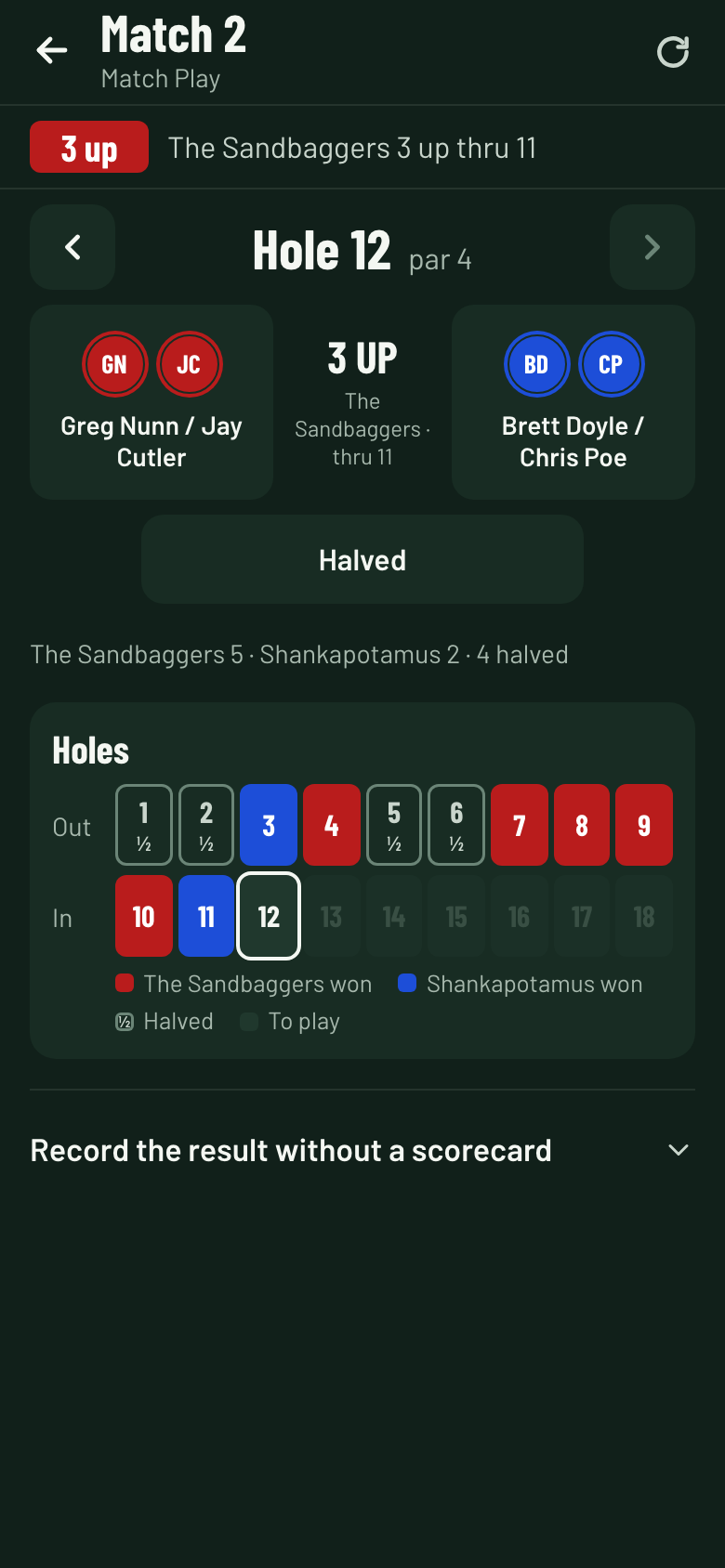
Match play asks who won the hole:
Stableford and stroke play ask what each player made, one player at a time — because nobody standing on a green thinks "four points", they think "birdie":
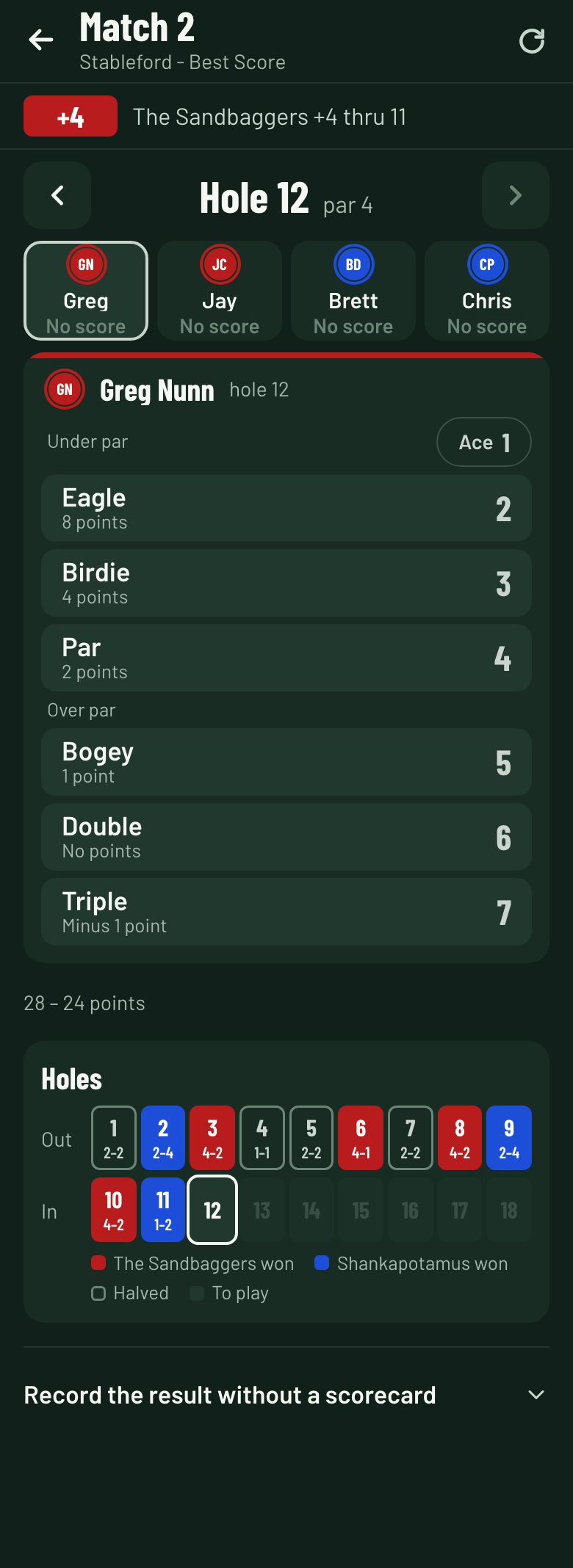
The players' chips run across the top, each with a face, a name and the score so far, or "No score". Under them is the player being asked, then one column of buttons: Under par (Eagle, Birdie), Par, and Over par (Bogey, Double, Triple, and in stroke play Pickup). Par looks like every other button; the Under par and Over par labels bracket it. Each button shows on its right the strokes it is on this hole, and in a Stableford round the points under its name: "4 points", "1 point", "No points", "Minus 1 point". A score, once tapped, fills with the team's color and shows a ✓ for about half a second, so the tap is seen to land; then the card slides to the first player still missing a score. The chips fill up as the hole goes in: each scored chip takes its team's color and a ✓, and the player being asked has a border in their team's color. Entering a hole never moves to the next hole.
Alternate shot asks once per team instead. The pair played one ball, so the ribbon carries two chips, one per team, with both partners' faces and first names on each, and one tap records the team's score for both partners. Two taps finish the hole.
A stroke-play round with no course attached asks for a bare number instead: a grid of 1 to 9, five across, under "This course has no pars yet, so tap the number of strokes." A Stableford round keeps its named buttons without pars, only without the strokes.
A hole is capped at quad bogey — the house rule. In stroke play the last button is Pickup, with "Quad bogey or worse" under it: tap it whether you holed out in quad or picked up. In Stableford a triple and a pickup both score minus 1, so the last button is Triple or worse (7+ on a par 4), and a player's chip shows it as "Triple+". The buttons are derived from the cap, so the screen cannot offer a score the server would then refuse.
An albatross is there, out of the way. It almost never happens, so instead of a full button it is a small one on the Under par line, above Eagle: a 2 on a par 5, and worth 16 Stableford points. On a par 4 it reads Ace, because three under there is a hole in one (so does Eagle on a par 3, for the same reason); a par 3 has no albatross.
Under the buttons, a summary of the hole: each side's score and how it was made ("Birdie 4 + Par 2"), who took it ("Ballers take it by 2."), and, once the hole is in, a yellow Next hole: 13.
Below that sit all eighteen holes, colored by who took each one, with the hole you are on outlined. Tap one to go back to it and correct it.
The grid, the ribbon and the running status all update live across every phone in the group at once, so two people in the same fourball see each other rather than fight. Nothing calls refresh() while you are mid-tap.
When there is no signal
Keep tapping. A hole entered with no signal stays on the card, ringed in yellow in the grid below it, where the legend adds Not sent yet. A panel on the card counts them — "2 holes waiting to send" — with a Send now button if you would rather not wait for the phone to notice. It sends itself when the signal comes back, and it survives a reload, so a locked pocket between the twelfth green and the clubhouse costs nothing. A hole held on the phone for more than twelve hours does not send itself: the panel says "Holes held over 12 hours wait for Send now."
Other screens need signal — this one does not, which the panel says while anything is waiting: "They're saved on this phone and send themselves when signal comes back. Other screens need signal; this one doesn't." A phone that cannot keep them says "This phone can't save them. Keep this page open until they send." Tapping back, or anything else that leaves the card, asks the phone to load a page, and with no signal the browser shows its own error instead. That is the phone, not the app: the holes you tapped are already on it and go up when the signal does. So stay on the card while the signal is gone: every hole left in the match can be entered from it, and leaving it may mean waiting for signal before you can open it again.
If somebody else recorded that hole while yours was waiting, you are asked rather than overruled. The notice names the hole and who moved — "someone recorded a 5 after you tapped 4" — and when it was one player's score the buttons carry both numbers: Keep mine (4) or Use theirs (5). When several people moved, they are plain Keep mine and Use theirs, and the notice says whose scores Keep mine would replace. A hole that cannot be sent for some other reason — the match has already been recorded, say — says so ("That match is already recorded.") and offers only Drop it.
Record the result without a scorecard offers its buttons when a card is finished or still empty, and explains itself in between. An unsent hole does not count as played, so a part-scored card with one still waiting sits in that middle state until the hole lands or you answer it.
Derived status versus recorded result
This distinction matters. A scorecard produces a derived status — "Ballers +3 thru 11". That is worth zero points until somebody taps Confirm. Standings, records, clinch lines and the trip total read the recorded result and nothing else.
Once the holes have decided a match, a yellow Confirm says what it will record — "Confirm: Ballers by 3 points" — over the line "The point goes on the Points tab once someone confirms."
Which is what makes the whole feature additive: ignore the scorecard entirely, or half-use it, and the scoreboard behaves exactly as it did before scorecards existed.
Editing a hole after confirming is allowed, and is not silent. When the holes stop agreeing with the recorded result, a red panel on the card says so and names the result that stands — "The scorecard no longer matches the recorded result (Ballers won)." — with Confirm again and what the holes now say, rather than overwriting somebody's attestation or hiding the disagreement. Until somebody taps it, the recorded result stays on the Points tab. Once the whole round is finished, only the commissioner's card can still be edited: everyone else's shows the same panel ending "The recorded result stands." in place of the button.
The commissioner's card also has Clear hole N under each scored hole and Reset this match at the bottom. Each takes two taps. A reset deletes every hole and any recorded result, and the match goes back to not started. It leaves the pairing alone.
Following a round on the Board
Once a round is drafted, the Board tab follows it. At the top: each side's points for the round, the round's name, the trip line ("15½ to win the trip", or who has won it) and the round's ("3 still out", or who took it). While matches are live, the momentum bar sits under them (§5, Streaks).
Then one row per match, edge to edge: the two pairs stacked, each on its own line with faces and full names, and a chip on the right — "+3" in a Stableford round, "3 shots" in stroke play, "Level" when nobody leads, or the tee time, outlined, before a match starts — with "thru 14" under it. The leader's line is tinted in its team's color and the other's names dim. Once a match's first hole is scored, its row adds the hole strip and the match flow chart, a line that follows the margin hole by hole; the hole numbers above the strips appear once any match has started.
- ✓ Final — a recorded result. The winner's line fills solid with its team's color; a halved match's chip reads Halved.
- Not confirmed yet, in yellow — the holes have decided the match but nobody has tapped Confirm. Its line stays tinted, not solid, and it is worth nothing yet.
Before any round is drafted, the Board says "Nothing has been drafted yet." and points at the Card tab.
7Standings and records
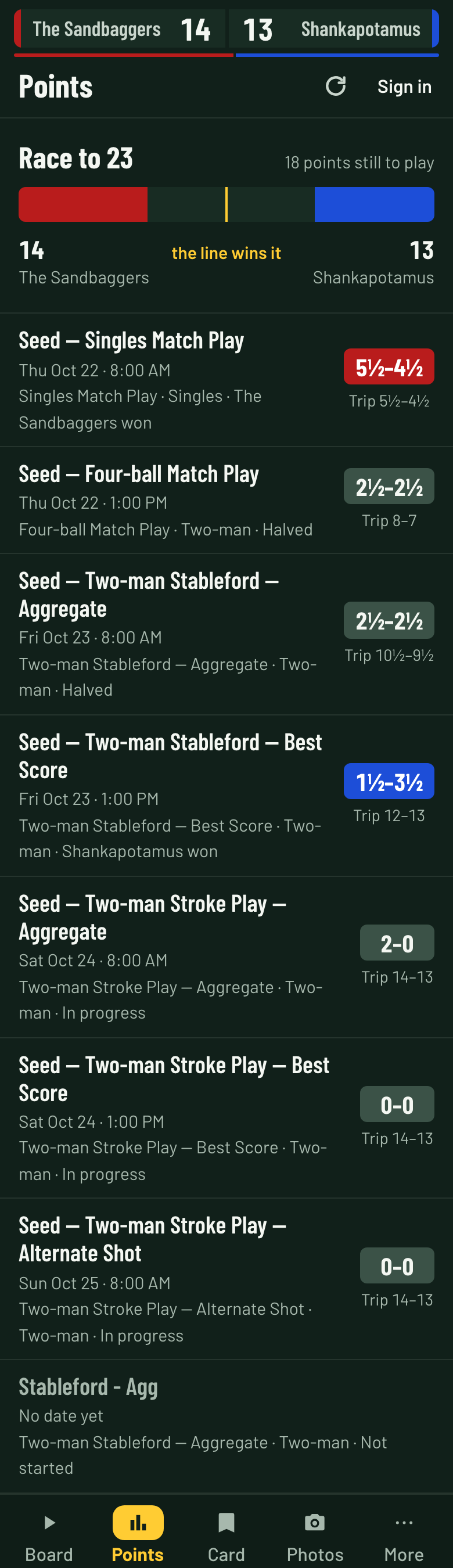
The Points tab opens on the race: Race to 15½ — the score that wins the trip — and how many points are still to play, over a bar each team fills from its own end toward a yellow tick in the middle, the line that wins it. Once the trip is won, the heading names the winner instead.
Then each round is a row: its name and when it is played, its score in a chip ("3–2"), in the winner's color once the round is decided, and the running trip total under it ("Trip 5–5"). A round is worth one point per match, so a ten-match singles round outscores a five-match 2v2 — which is why both numbers are shown.
A round not yet drafted is listed muted, with no score, from the moment the round exists.
The trip score also rides in the scorebug at the top of every tab, so it is never more than a glance away.
/records (More → Players) is the same idea for people:
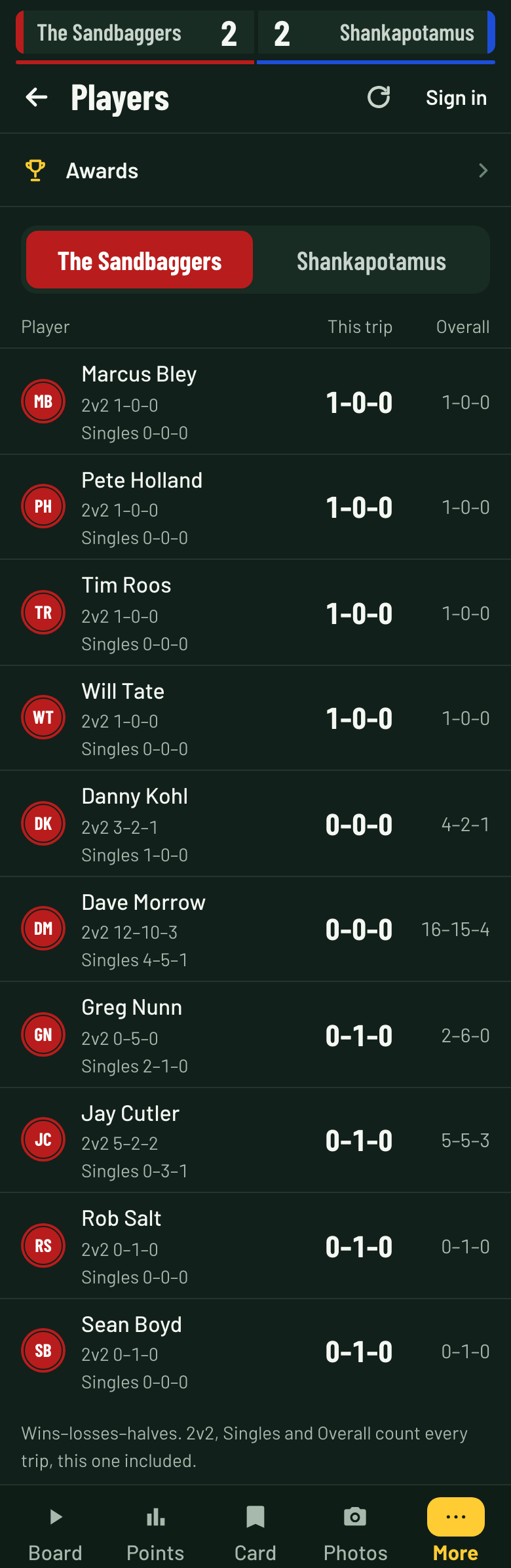
One team at a time: the switch at the top, named for the two teams, changes sides, and a captain's phone opens on their own. Each player has their face, their record for This trip, and their Overall record across every trip beside it, with the 2v2 and singles split on a line under the name. Once awards have been played, an Awards row sits at the top.
Both screens are live — a phone left open on either updates as results come in.
8Photos
Anyone can post photos from the course, everyone can browse them all trip on the Photos tab, and in the evening the television shows them as a live wall.
The Photos tab
Every photo from the trip, newest first — the line at the top says so, "24 from the trip, newest first", and adds "3 are yours" when some are — in a grid of small thumbnails running edge to edge, so scrolling the whole trip costs a phone little data. A new post appears on every open phone as it lands, with no reload. Looking needs no code, like every other tab.
Tap a thumbnail for the whole photo, with its caption and the poster's face, name and day ("Danny Kohl, Thursday"); the top says where you are, "3 of 24". Swipe, or use the arrows, to step through them; ‹ Photos goes back to the grid.
Every photo has Save this photo, whoever posted it. On a phone or tablet it opens the share sheet, where an iPhone's Save Image puts it in Photos; a computer downloads it instead. Over a slow connection the photo can take too long to arrive for the share sheet to open; then a line under the button says "The photo is ready. Tap Save again." and the second tap opens the sheet at once. The copy is the one the app keeps, not the poster's original.
Adding photos
Add photos, the yellow button floating at the bottom right, opens the phone's own picker, so it offers whatever the phone does — take a photo, or choose from the library — and you can choose several at once. The rest happens on a sheet over the grid. Each photo gets an optional caption of up to 80 characters, then Post 3 photos (or Post it, for one) sends them one after another. The sheet says Posting…, each photo shows its own progress, and at the end it counts what landed — "Posted 2 of 3" — so one photo that fails never loses the rest. The ones that failed can be tried again, captions kept, with Try that one again (or Try 2 again); Done closes the sheet.
The first time on a phone it asks two things first, and remembers both on that phone:
- The trip code, from the group chat. A phone signed in as a captain or the commissioner skips it. If the commissioner changes the code, a phone is asked again the next time it posts, with the photos it had chosen and their captions kept.
- Who are you? — the roster as a grid of faces: tap yours, then I'm Danny Kohl. Your photos carry your name, and the Card tab uses it to put your match first (§6). It is a label, not a sign-in: not you?, under the count at the top of the tab ("Posting as Danny Kohl ·
not you?"), changes it.
Then tap Add photos again to choose the photos: an iPhone opens its picker only from a tap.
Photos are shrunk on the phone before they are sent, whatever the camera took: about 1 MB a photo from an iPhone, a large copy for the television and the viewer, and a small one for the grid.
Until the commissioner sets a trip code, the tab says posting opens once one is set; captains and the commissioner can post already. The wall holds 500 photos, about half the free storage plan at iPhone sizes, and past that, posting is refused with a sentence asking the commissioner to make room.
Posting also stops if the app's storage nears the free plan's limit, whatever the count. The tab then says "Photo storage is nearly full. Ask the commissioner to make room." in place of Add photos. Looking carries on as before, and so does deleting your own.
Deleting your own
Open one of your photos on the phone you posted it from and it has Delete this photo; it then says Tap again to delete it, because there is no undo. It leaves every phone and the television at once.
No other phone has that button — not even your own in a different browser — because only the browser that posted a photo holds its key. The commissioner can delete any photo.
On the television
At Setup → TV display, Photos puts the wall on /tv: nine photos at a time, one big and eight small, and every five seconds one of them swaps for the next in line. The big one carries the caption, the poster's name and the day, and changes about every fifteen seconds. Every photo gets a turn before any comes round again, and none is ever on the wall twice.
A new post jumps the line into the big tile within a few seconds, so whoever posted it sees it land, and it stays there for the next ten to fifteen seconds, or until another post lands. A deleted photo leaves the wall at once.
With fewer than nine photos the wall uses a smaller layout rather than leaving gaps — a single photo fills the screen. Photos are cropped to fill their tiles, so a portrait photo loses some of its top and bottom on the wall; the phone always shows the whole photo.
An empty wall says to add yours from the Photos tab, beside the site's join code. The trip code never appears on the television: /tv is public.
The wall is the television's one real data cost. Each photo on it is about 1 MB and one swaps every five seconds, so the first time round the television downloads every photo — about 500 MB for a full wall — from whatever it is connected to, and every time round after that too if its browser cannot keep them. Worth knowing on a phone's hotspot, and it counts against the free plan's data allowance (see For the commissioner).
For the commissioner
Setup → Codes → Trip code (photos and itinerary) sets the code: ten characters or more, no spaces, case sensitive. Pick something you can read aloud, because it goes to the group chat. The app refuses a trip code that is already somebody's sign-in code, and a sign-in code that is the trip code — typed at /enter, a code that was both would sign in everybody who knows it. Turn off posting removes it, and then only captains and you can post or see the itinerary. Changing it asks every phone for the new one the next time it posts; photos already posted stay, and so does each phone's Delete.
Setup → Photos lists every photo with its caption, who posted it and the day, and a Delete on each — tap Sure? to confirm. Delete every photo is for clearing the test photos before the trip: it asks again on a separate Yes, delete all N button, and there is no backup. Both remove the files as well as the photo, and the wall and every phone follow at once.
Its Storage line, at the top, is every file in the app — trip photos, headshots and logos — against the free plan's 1 GB. Posting stops at 800 MB, which leaves the rest for headshots and logos; past that the line adds "Posting has stopped. Delete photos to make room." A phone that already has the Photos tab open keeps saying storage is full until the page is reloaded: the photos you delete leave it at once, but the notice is read when the page loads. If the figure cannot be read just then, the line says so, and posting carries on under the 500-photo cap.
The free plan's other limit is egress, the data the app sends out to every phone and the television: 5 GB a month. Setup cannot show it; the Supabase dashboard's Usage page does. Left up every evening, the wall could be most of it, so the plan for the trip is to keep the television off Photos until the last night and put the wall up for that evening. Everyone has every photo on their phone's Photos tab all along. TRIP-RUNBOOK.md has the figures and the daily check.
After the trip
The commissioner downloads every photo to a laptop with npm run photos:export, from a copy of this repository; TRIP-RUNBOOK.md has the steps. Beside the photos, captions.csv lists who posted each one and its caption. They are the 1600px copies the app keeps, not the originals.
9Rehearsal
Setup → Demo & rehearsal seeds a fake round you can draft, and then play, without touching anything real.
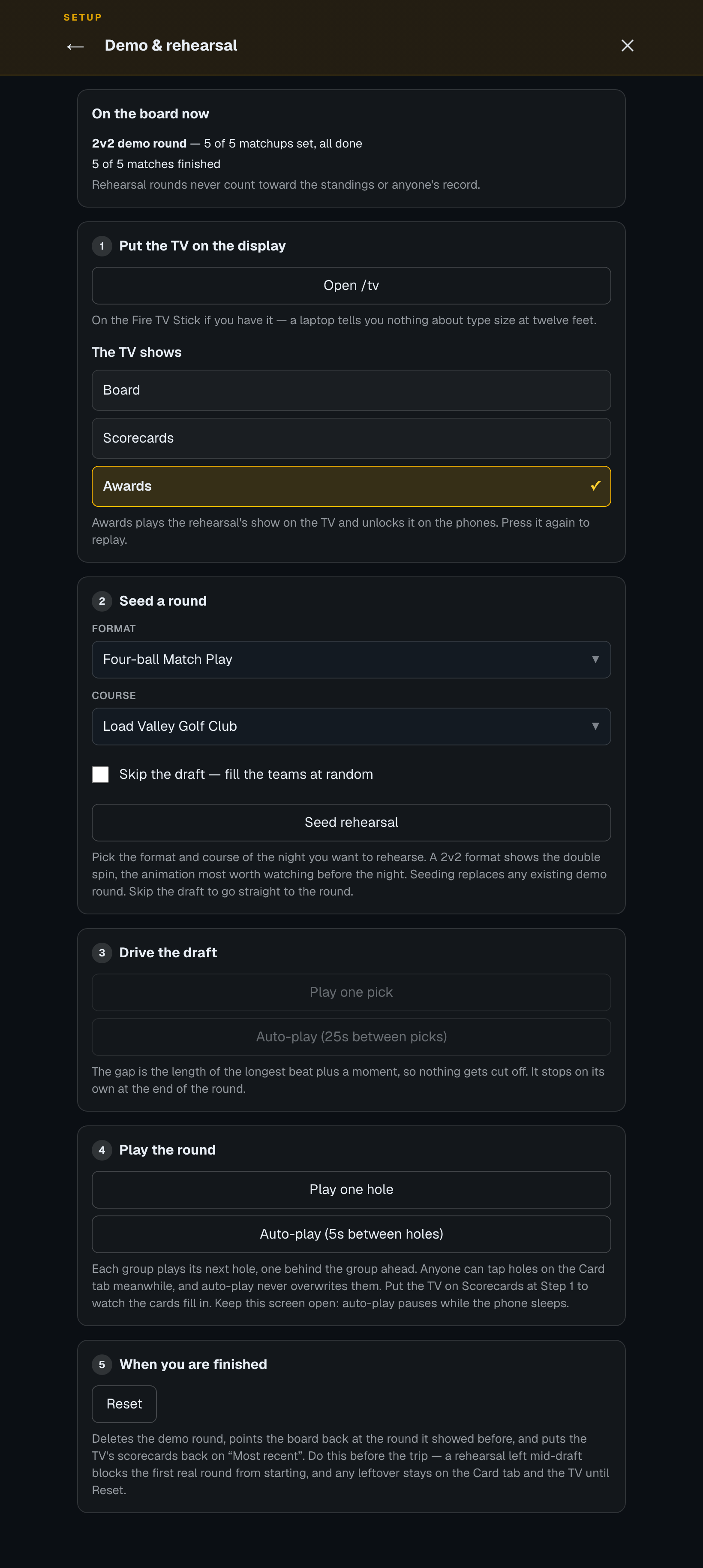
Pick the format and the course of the night you want to rehearse, then Seed rehearsal. Only eighteen-hole courses are offered, because a rehearsal plays one whole course. Tick Skip the draft to have the teams filled at random and go straight to the round; the TV lands on the drafted board without the pick animations. Otherwise step through the draft one pick at a time, or let it auto-play with a realistic gap between beats. This screen makes the picks for both sides; /pick only lets the commissioner watch. Point the TV at the board and watch a whole draft run itself.
The TV shows, at step 1, points the TV from this screen, so a rehearsal never sends you to Setup → TV display and back: Board for the draft, Scorecards for the round and Awards for the show. Each opens once there is something to show: the board at once, the scorecards once the draft is done, the awards once every match is in. A tick means the TV is drawing this rehearsal; otherwise the card says which view the TV is on.
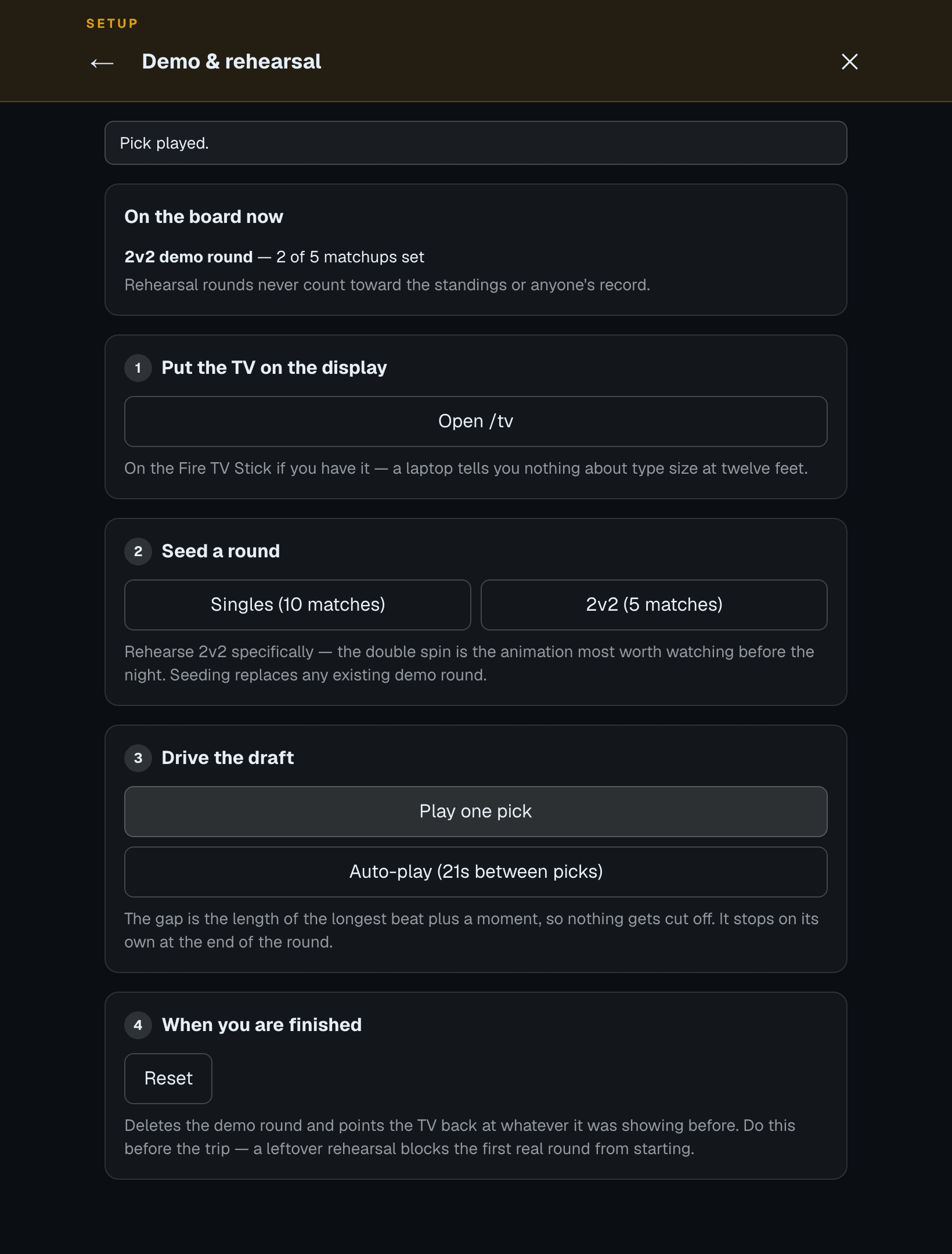
Once the draft is done, Play the round scores it: every group plays its next hole, one behind the group ahead, every five seconds — or one tick at a time with Play one hole. The holes are random, each drawn as it is played at a mid-handicap mix: mostly pars and bogeys, a birdie now and then, the odd pickup. So every rehearsal is a different round, and like a real one it shows what it shows: nearly always the hot and cold marks, the 3 STRAIGHT chip, the momentum bar and most of the awards, though a given round may have no eagle, no wire-to-wire win or, in match play, no comeback. Press Scorecards under The TV shows to watch the cards fill in. It pins the rehearsal, so the cards show it even over a real round pinned at Setup → TV display. A singles round has ten matches; on a television they all fit, and on a shorter screen they scroll.
The rehearsal is on the Card tab too, tagged Rehearsal, so you or anyone with the link can tap a hole by hand and watch the TV take it. Auto-play never overwrites a score somebody entered.
When every match is in, Awards under The TV shows plays the rehearsal's show; press it again to replay. Play awards at Setup → TV display offers it too, labeled "(rehearsal)".
Keep the demo screen open while it plays. Auto-play runs on your phone, so it pauses while the phone sleeps and carries on from where the scores are. If the page reloaded meanwhile, press Auto-play again: it picks up from the holes already in.
A rehearsal leaves no trace. Demo rounds are excluded from standings, from player records and from the trip score in the scorebug, so you can practice on the Fire TV Stick the night before without putting a fake result on the board. While one is using a course, that course cannot be deleted; the course screen says to reset the rehearsal first.
Reset before the trip, though. A rehearsal left mid-draft blocks the first real round from starting, and one that finished — or skipped its draft — does not block anything, so nothing will remind you: it stays on the phone Awards page, and on every board whenever no round is armed, until Reset takes it off, and on the Card tab, under Finished once its last match is in. Pressing Scorecards under The TV shows replaces any pin set at Setup → TV display, and Reset then puts the boards back on Automatic, so pin a real round again afterwards if you want one.
10Things that look broken and aren't
| What you see | Why |
|---|---|
| A nomination is visible before the answer | Intended. The room is supposed to react to it. |
| The last matchup of a round is forced | One player or pair remains per side. The board says so and skips the spin. |
/watch doesn't follow the TV remote's view | Intended. The view drives the television only; Which round moves every phone's Board too. |
| A round shows on Points before it's played | Intended — muted, with no score, from the moment it exists. |
| Rounds are worth different point totals | A round is worth one point per match. Both figures are shown. |
| Sit-outs can't be changed | Correct. They freeze once a round has been started. |
| A player can't be deleted | Correct, if they've played a real match. |
| There is no shot clock | Removed. Picks aren't timed on this trip. |
| A streak mark vanished | Usually the latest hole ended the run. Otherwise a hole was corrected, a result was recorded, or a hole was left blank behind a later one — the run returns once it is filled in. |
| No player marks on a round | Match play records who won a hole, not what anybody shot. A stroke-play round needs a course attached, for its pars. |
| No Delete on your own photo | Only the browser that posted a photo can delete it. The commissioner can, at Setup → Photos. |
| A photo posted twice | Its first send arrived but the answer was lost — the phone locked, or the signal dropped — so it was tried again. The phone can delete only the copy it heard back about; the commissioner can delete the other. |
| A captain's phone jumped to Pick on its own | Intended. Their draft started; it jumps back to the Board when the draft ends. |
| A match on the Board says Not confirmed yet | The holes have decided it, but nobody has tapped Confirm on its card. Until somebody does, it is worth nothing on Points. |
| No chart under a match on the Board | It appears once the match's first hole is scored. |
| Your match isn't first on the Card tab | The Card tab knows you by the name tapped under Who are you? on the Photos tab. A phone that never picked one has no match of its own. |
| A hole waiting to send didn't go when the signal came back | It was held on the phone for over twelve hours. Those wait for Send now. |
11Route map
| Route | Code needed | What |
|---|---|---|
/ | no | Redirects to whichever tab is first for your role |
/enter | — | Sign in with a role code |
/watch | no | The draft, then the round in play, on a phone |
/standings | no | Trip score by round |
/more | no | Your role, Players, Awards, the Itinerary and this guide |
/records | no | Player win-loss (under More) |
/awards | no | Every played round's awards, and the trip's |
/itinerary | the trip code or any role | The itinerary's images |
/results | no | Report results, score hole by hole |
/photos | no; the trip code or any role to post | Every trip photo, and posting your own |
/pick | captain | Nominate and answer |
/tv | no | The television, in whichever view is selected |
/setup | commissioner | Hub |
/setup/rounds | commissioner | Create, edit, start, restart, delete rounds |
/setup/formats | commissioner | Formats and scoring modes |
/setup/courses | commissioner | Courses and pars |
/setup/remote | commissioner | Drive the television |
/setup/players | commissioner | Roster, records, headshots |
/setup/teams | commissioner | Names, colors, captains, logos |
/setup/roster | commissioner | Per-round sit-outs |
/setup/tee-sheet | commissioner | Reorder tee times |
/setup/codes | commissioner | See and change role codes and the trip code |
/setup/photos | commissioner | Every photo, and deleting them |
/setup/itinerary | commissioner | The itinerary's images: add, caption, order, delete |
/demo | commissioner | Rehearsal |
If everything is on fire
The draft is a conversation with a scoreboard. If the app is unavailable, pick the matchups on paper and enter them later — nothing about the trip depends on the software, and the database is a record of a decision, not the decision itself.